We practice what we preach. This website is built and deployed using the same principles, tools, and frameworks we recommend to our clients. Here’s a complete breakdown of how kaizenconsultancy.io is architected, secured, deployed, and what it actually costs to run.
TL;DR for non-techies
This website costs about a pound a month to run. It’s hosted on Amazon’s cloud infrastructure, loads fast anywhere in the world, is secured to enterprise standards, and can be rebuilt from scratch in 10 minutes. Every part of it is automated - no manual steps, no clicking through dashboards, no room for human error. We built it this way because it’s exactly how we’d build cloud infrastructure for a client. If we can’t do it for our own site, why would you trust us to do it for yours?
Now, for the technical deep dive…
Architecture Overview
The site is a static website hosted on AWS S3 with CloudFront as the CDN, deployed and managed entirely through Terraform.
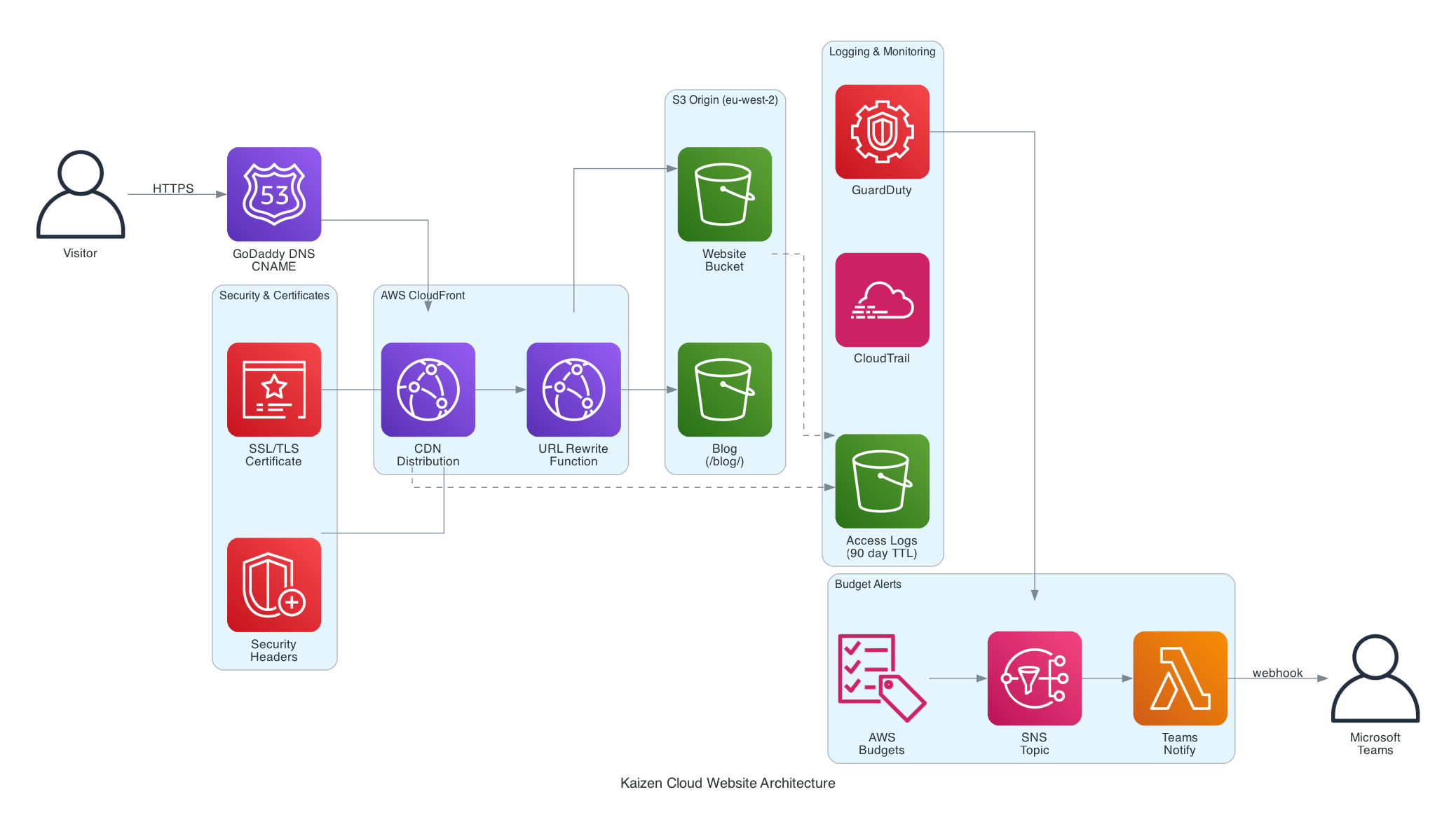
Note: DNS is managed in GoDaddy via CNAME records pointing to CloudFront, not Route 53. The diagram shows the logical flow.
The key components:
- S3 (eu-west-2) - private bucket storing HTML, CSS, JS, and images. No public access enabled.
- CloudFront - global CDN distribution with HTTPS enforcement, custom domain, and security headers.
- CloudFront Function - URL rewrite function that resolves directory paths (e.g.
/blog/) toindex.html. - ACM - SSL/TLS certificate for
kaizenconsultancy.ioand*.kaizenconsultancy.io, issued inus-east-1(required by CloudFront). - S3 Logs Bucket - dedicated bucket for S3 access logs and CloudFront access logs, with a 90-day lifecycle policy.
- Hugo - static site generator for the blog, building Markdown posts into HTML.
Everything is defined in Terraform. No manual console clicks. No drift.
Deployment Pipeline
Every change follows a repeatable, automated process:
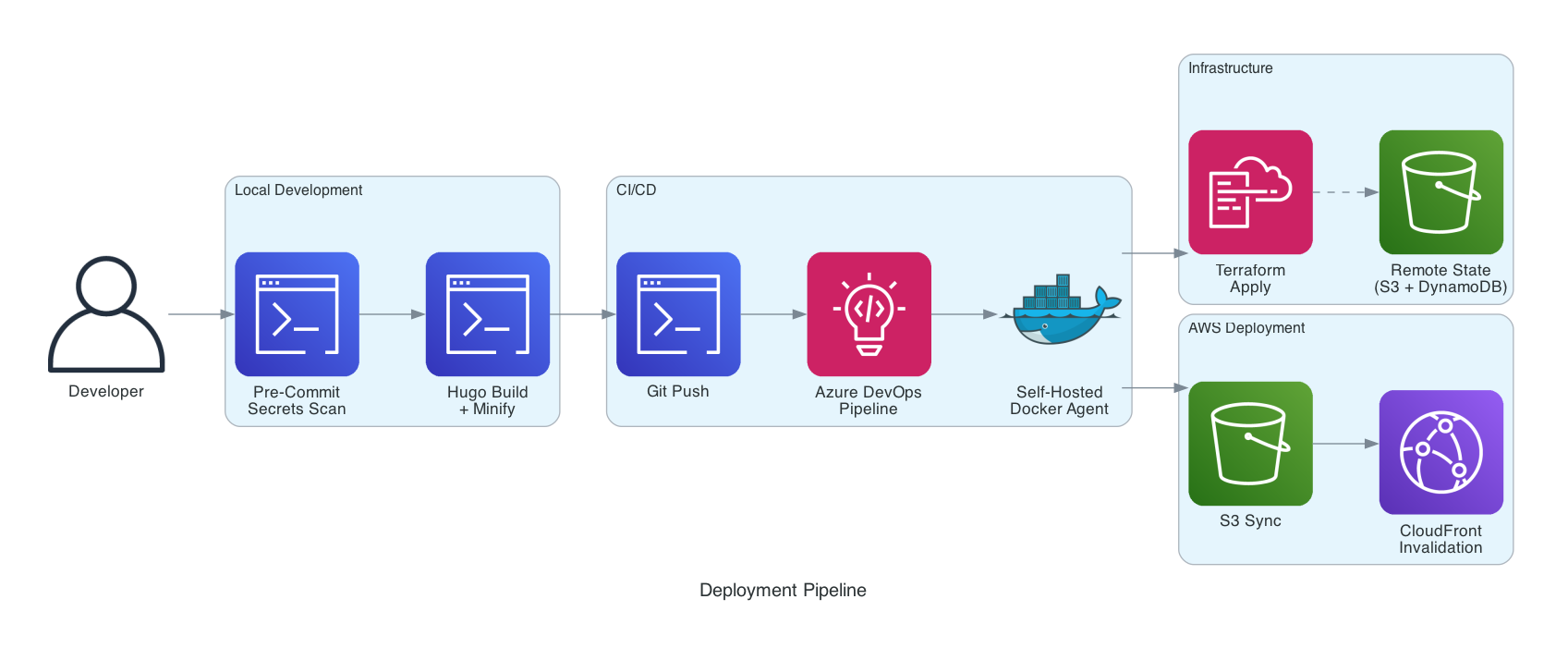
- Code changes are made locally (HTML/CSS/JS for the main site, Markdown for blog posts)
- CSS and JS are minified using
clean-css-cliandterser - Hugo builds the blog with
hugo --minify - Terraform provisions or updates infrastructure
- Files are synced to S3 with correct content types and cache headers
- CloudFront cache is invalidated
The full deployment script handles steps 2-6 in a single command. An Azure DevOps pipeline automates this on push to main, including Terraform format checks and validation.
Self-Hosted CI/CD Agent
Rather than using Microsoft-hosted agents (which require a parallelism request and have limited customisation), we run a self-hosted Azure DevOps agent in a Docker container on an M1 Mac.
The agent is defined as a Dockerfile with everything pre-installed:
- Ubuntu 22.04 (ARM64 for Apple Silicon)
- Node.js 20.x, Terraform, AWS CLI v2, Git
- Playwright dependencies for smoke testing
- Azure Pipelines Agent
It’s managed via Docker Compose - docker-compose up -d and it registers itself with Azure DevOps, ready to pick up pipeline jobs. AWS credentials are passed as environment variables (never baked into the image), and the agent runs as a non-root user.
Why self-hosted?
- Zero cost - uses local compute instead of paying for hosted agents
- Full control - we choose exactly what tools are installed and at what versions
- No parallelism limits - Microsoft-hosted agents require a request and approval process for free-tier organisations
- Fast startup - the agent is always running, no cold start waiting for a hosted agent to spin up
- ARM64 native - runs natively on Apple Silicon without emulation overhead
The agent container is defined in its own repository, separate from the website and landing zone. Same principle: separation of concerns.
Git Workflow
We commit directly to main. No feature branches, no pull requests, no merge conflicts.
For a single-developer consultancy site, feature branches add ceremony without value. Testing is done locally - Hugo’s dev server gives instant feedback on blog posts, and the main site is just static HTML you can open in a browser. If something breaks, git revert is one command away.
That said, we still follow good Git hygiene:
- Semantic versioning - every significant release is tagged (
v1.0.0,v1.1.0,v1.2.0). Tags mark stable, deployed states you can roll back to. - Meaningful commit messages - every commit describes what changed and why, not just “updated stuff”.
.gitignoredone properly - Terraform state,.tfvarswith secrets, build output (blog/public/), OS files, and source branding assets are all excluded. The repo contains only what’s needed to build and deploy.- Changelog - a
CHANGELOG.mdtracks every release with categorised changes.
If this were a team project, we’d add feature branches, pull requests, and code review. The workflow should match the team size and risk profile - not a textbook.
Pre-Commit Hooks
Every commit runs through a pre-commit hook that scans for secrets and common mistakes before code ever reaches the repository. The hook checks for:
- AWS access keys and secret keys
- Private keys (RSA, DSA, EC, OpenSSH)
.envfiles andterraform.tfvarsbeing committed- Terraform state files
- Hardcoded passwords and API tokens
- Files over 5MB
- TODO/FIXME comments (warning only)
If any check fails, the commit is blocked. This is especially important when working with AI tools like Kiro - the AI has access to your terminal and can generate code that might inadvertently include sensitive values. The pre-commit hook acts as a safety net, catching anything that shouldn’t be in version control regardless of who (or what) wrote it.
The hook lives in .githooks/pre-commit and is activated with git config core.hooksPath .githooks. It’s the same hook across all repositories.
.gitignore Strategy
The .gitignore is deliberately comprehensive:
- Terraform state and vars -
terraform.tfstate,.tfvars(except.tfvars.example), and.terraform/are excluded. State is in S3, and tfvars contain secrets. - Build output -
blog/public/is generated by Hugo and shouldn’t be versioned. It’s rebuilt on every deploy. - Source assets - the
assets/folder contains branding source files (PSDs, AI files, videos) that are too large for git and aren’t needed for deployment. - OS and editor files -
.DS_Store,.vscode/, swap files.
The principle: the repo should contain only what’s needed to build and deploy. Everything else is either generated, secret, or belongs somewhere else.
Development Tooling
This entire site was built in partnership with Kiro, an AI-powered IDE. From the initial HTML structure through to Terraform infrastructure, deployment scripts, blog setup, and this very post - Kiro was involved at every step.
What makes it particularly effective is the steering file. This is a Markdown file (.kiro/steering/project.md) that lives in the repo and provides persistent context across every conversation:
- AWS configuration (profile, region, bucket names, distribution IDs)
- Deployment conventions (content types, cache headers, approval requirements)
- Project conventions (British English, no em dashes, Lucide icons, dark mode default)
- Technology decisions (what we use, what we don’t, and why)
- Git workflow (commit, tag, push patterns)
Without the steering file, every new conversation would start from scratch - “what’s the bucket name?”, “which AWS profile?”, “do you use feature branches?”. With it, the context is always there. It’s like onboarding documentation that the AI actually reads.
The landing zone repo has its own steering file with different context (account ID, GuardDuty detector ID, deployed resources). Each repo carries its own operational knowledge.
Well-Architected Framework Assessment
We’ve designed this site against all six pillars of the AWS Well-Architected Framework.
1. Operational Excellence
How we run and monitor the site:
- Infrastructure is 100% defined in Terraform - every resource is version-controlled, reviewable, and repeatable
- Terraform state is stored remotely in S3 with DynamoDB locking - no local state files, no risk of state corruption from concurrent runs, and full version history via S3 bucket versioning
- Two separate Terraform repositories (website and landing zone) with isolated state files - a bad apply in one can’t break the other
- Deployment is automated via a single script that handles minification, S3 sync, content type setting, cache headers, and CloudFront invalidation
- Azure DevOps pipeline runs
terraform fmtandterraform validateon every push - S3 and CloudFront access logs are captured in a dedicated logging bucket
- Changes are tagged with semantic versioning and tracked in a changelog
Why it matters: If the site needs to be rebuilt from scratch, we can do it in under 10 minutes with a single terraform apply and deploy script. No tribal knowledge required.
2. Security
This is where the MSc in Network Security comes in handy.
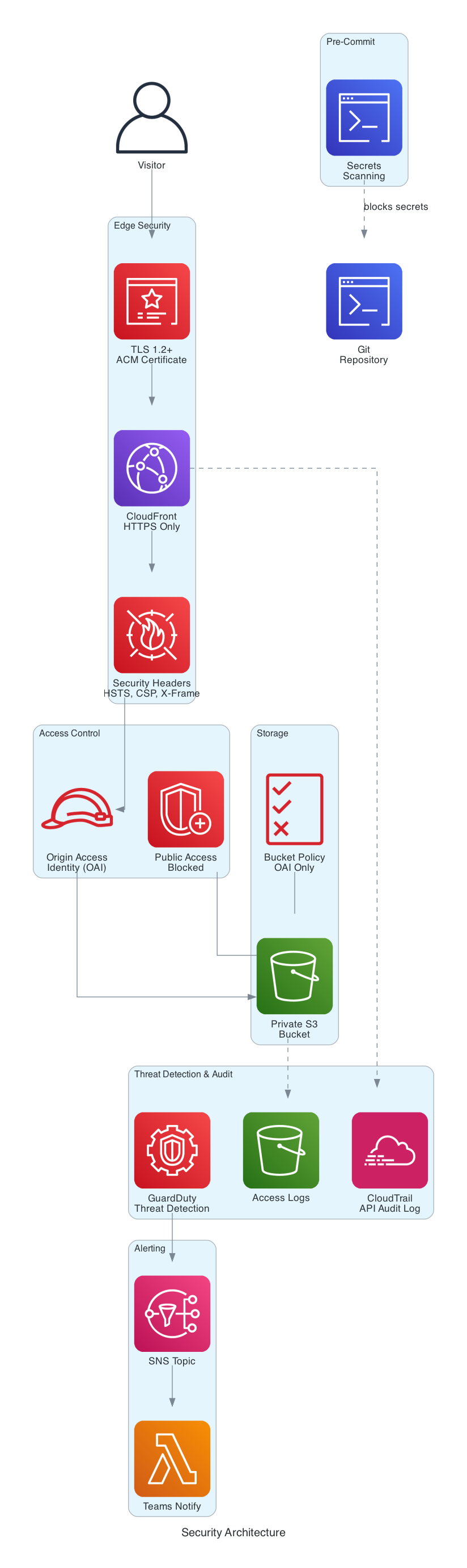
Layers of security:
- HTTPS everywhere - CloudFront enforces
redirect-to-https. No HTTP traffic reaches the origin. - TLS 1.2 minimum - configured via CloudFront’s
minimum_protocol_version: TLSv1.2_2021 - Private S3 bucket - all public access is blocked. CloudFront accesses S3 exclusively via an Origin Access Identity (OAI).
- Security response headers - CloudFront injects headers on every response:
Strict-Transport-Security(HSTS with preload, 1 year)X-Content-Type-Options: nosniffX-Frame-Options: DENYReferrer-Policy: strict-origin-when-cross-originX-XSS-Protection: 1; mode=blockContent-Security-Policy- restricts scripts, styles, fonts, and connections to trusted sources only
- Cookie consent - Google Analytics only loads after explicit user consent, complying with UK GDPR. The consent choice is stored in localStorage (not a cookie) and persists across visits. A full cookie policy page documents exactly what’s collected and why.
- Email obfuscation - the contact email is assembled via JavaScript at runtime, not present in the raw HTML, preventing bot scraping. Visitors see “Click to reveal” until they hover or tap.
Why it matters: Even a static site can be a target. Clickjacking, content injection, and data leakage are all real risks. Defence in depth costs nothing extra on a static site - there’s no excuse not to do it.
What we deliberately didn’t include (and why)
For a static brochure site with no user input, no API, and no dynamic content, several AWS security services would be overkill:
- AWS WAF - protects against SQL injection, XSS, and bot traffic. Since there’s no form, no database, and no server-side processing, there’s nothing to inject into. The CSP header handles the XSS vector. WAF would add ~$6/month for zero practical benefit here.
- GuardDuty - Enabled. We decided to enable GuardDuty at the account level via a separate landing zone Terraform repository. At under $1/month for a low-activity account, it’s cheap insurance against credential compromise and crypto mining attacks. It monitors CloudTrail logs, VPC flow logs, and S3 data events for suspicious activity. The cost-to-risk ratio makes it a no-brainer even for a single static site.
- CloudTrail - Enabled. Multi-region trail logging all API activity to a dedicated S3 bucket with log file validation. Logs transition to Glacier after 90 days and expire after 1 year. This gives us a full audit trail of every action taken in the AWS account. Like GuardDuty, this is managed in a separate landing zone repository because it’s an account-level concern, not a website concern.- Shield Advanced - DDoS protection beyond the standard Shield (which is free and already active on CloudFront). Advanced costs $3,000/month. For a consultancy website, standard Shield is more than sufficient.
- Inspector - scans EC2 instances and container images for vulnerabilities. There are no instances or containers here, so there’s nothing to scan.
- Macie - discovers and protects sensitive data in S3. The bucket contains only static HTML, CSS, JS, and images. No PII, no secrets, no sensitive data.
- Security Hub - aggregates findings from GuardDuty, Inspector, Macie, and Config. Without those services generating findings, there’s nothing to aggregate.
- KMS - S3 server-side encryption is enabled by default (AES-256). Customer-managed KMS keys would add cost and complexity for no additional security benefit on public website content.
The principle: implement every security control that’s free or low-cost and relevant to the threat model. Don’t pay for services that protect against threats that don’t exist in your architecture. But do invest in account-level visibility (GuardDuty, CloudTrail) because the cost of not knowing is always higher than the cost of monitoring.
Landing Zone Separation
Account-level security services (GuardDuty, CloudTrail) are managed in a separate Terraform repository (landing-zone-single-acc), not in the website repo. This is deliberate:
- Separation of concerns - the website repo manages website infrastructure. The landing zone repo manages account-level governance. Different lifecycles, different blast radius.
- Reusability - if we add more workloads to this account, they all benefit from GuardDuty and CloudTrail without duplicating configuration.
- Independent deployment - updating the website doesn’t risk breaking account-level security, and vice versa.
- Terraform state isolation - each repo has its own state file. A bad
terraform destroyin the website repo won’t disable GuardDuty.
This mirrors how we’d structure a real enterprise landing zone, just at a smaller scale.
3. Reliability
How we ensure the site stays up:
- CloudFront serves content from edge locations worldwide. If one edge goes down, traffic routes to another automatically.
- S3 provides 99.999999999% (11 nines) durability for stored objects.
- Custom error pages - CloudFront serves a branded
404.htmlfor missing pages instead of a generic error. - No single points of failure - there’s no server to crash, no database to corrupt, no application to restart.
- Rebuild from zero - the entire site can be redeployed from the Git repository in minutes.
Why it matters: Static sites on S3 + CloudFront are inherently resilient. The architecture eliminates the most common causes of downtime: server failures, database issues, and application crashes.
4. Performance Efficiency
How we keep the site fast:
- CloudFront CDN - content is cached at edge locations close to visitors, reducing latency
- WebP images - the hero background was converted from PNG (2.4MB) to WebP (229KB), a 90% reduction
- Minified CSS and JS - production files are compressed, reducing transfer size
- Cache-control headers - static assets (CSS, JS, images) are cached for 1 year with
immutableflag. HTML is cached for 5 minutes withmust-revalidate - Gzip compression - enabled on CloudFront for all compressible content types
- Preconnect hints - Google Fonts connections are established early via
rel="preconnect" - No JavaScript frameworks - vanilla JS only. No React, no Vue, no 500KB bundle for a brochure site
- Dark mode by default - reduces eye strain and looks sharp. Users can toggle to light mode and the preference persists via localStorage
Why it matters: Page load speed directly impacts user experience and SEO rankings. Every millisecond counts, and every unnecessary kilobyte is waste.
5. Cost Optimisation
What this site actually costs to run:
| Resource | Monthly Cost |
|---|---|
| S3 storage (< 10MB) | ~$0.01 |
| S3 requests | ~$0.01 |
| CloudFront (within free tier) | $0.00 |
| Route 53 (DNS on GoDaddy) | $0.00 |
| ACM certificate | $0.00 |
| CloudFront Function | $0.00 |
| S3 logs bucket | ~$0.01 |
| GuardDuty | ~$1.00 |
| CloudTrail (1 trail free) | $0.00 |
| CloudTrail S3 storage | ~$0.02 |
| Total | ~$1.10/month |
That’s just over a pound per month for a globally distributed, HTTPS-secured, CDN-cached website with custom domain, security headers, access logging, threat detection, and full API audit trail.
How we keep costs down:
- Static site - no EC2 instances, no load balancers, no databases
- CloudFront free tier - 1TB data transfer and 10M requests per month
- S3 lifecycle policies - logs expire after 90 days, preventing unbounded storage growth
- PriceClass_100 - CloudFront distribution uses the cheapest price class (North America and Europe edge locations)
- No over-engineering - we didn’t add a WAF, Lambda@Edge, or DynamoDB because we don’t need them
Budget Alerts
Even at this spend level, we’ve set up AWS Budget alerts that notify us via Microsoft Teams:
- $5 warning - alerts at 80% and 100% of budget
- $10 critical - alerts at 100%
The alert flow: AWS Budgets triggers an SNS topic, which invokes a Lambda function that formats the alert as an Adaptive Card and posts it to a Teams channel via incoming webhook. Email notifications go to the inbox as a backup.
This is managed in the landing zone repository alongside GuardDuty and CloudTrail - account-level concerns, not website concerns.
Why bother for a $1/month site? Because the alert isn’t about the normal spend. It’s about catching unexpected charges - a misconfigured resource, a compromised credential spinning up instances, or a forgotten experiment left running. The budget alert costs nothing. The surprise bill it prevents could cost hundreds.
Why it matters: Cloud cost optimisation isn’t about spending less - it’s about not spending more than you need to. This site delivers enterprise-grade infrastructure for the cost of a cup of coffee per year.
6. Sustainability
- Minimal compute - no servers running 24/7. Content is served from cache.
- Efficient assets - WebP images, minified code, and compression reduce data transfer
- PriceClass_100 - limits distribution to regions where our audience actually is, rather than replicating globally
- 90-day log retention - data that’s no longer useful is automatically deleted
Cloud Adoption Framework Alignment
This project follows the Cloud Adoption Framework principles:
Strategy - clear business goal: a professional web presence at minimal cost, fully automated, with no ongoing maintenance burden.
Plan - infrastructure designed upfront in Terraform before any resources were created. No “click and hope” approach.
Ready - landing zone principles applied even at this small scale: private S3, OAI access, logging enabled, security headers configured.
Adopt - the site was migrated from a concept to production using a structured approach: infrastructure first, content second, optimisation third.
Govern - SCPs and Config Rules aren’t needed for a single-bucket static site, but the patterns are in place: Terraform state management, access logging, and policy-as-code via CloudFront response headers.
Manage - operational excellence through automation. The deploy script, CI/CD pipeline, and Terraform ensure the site can be managed, updated, and rebuilt without manual intervention.
Technology Stack
| Layer | Technology |
|---|---|
| Frontend | HTML5, CSS3, Vanilla JS |
| Icons | Lucide Icons |
| Fonts | Google Fonts (Inter) |
| Blog | Hugo static site generator |
| Infrastructure | Terraform (2 repos: website + landing zone) |
| Hosting | AWS S3 |
| CDN | AWS CloudFront + CloudFront Functions |
| SSL | AWS ACM |
| DNS | GoDaddy (CNAME to CloudFront) |
| Threat Detection | AWS GuardDuty |
| Audit Logging | AWS CloudTrail |
| CI/CD | Azure DevOps Pipelines + self-hosted Docker agent |
| Analytics | Google Analytics 4 (consent-gated) |
| Version Control | Git (Azure DevOps) |
Key Takeaways
Static doesn’t mean simple - this site has security headers, CDN caching, automated deployment, cookie consent, dark mode, and a blog. All without a single server.
Terraform everything - every AWS resource is in code, state is in S3 with locking, and two repos keep concerns separated. If the account was wiped tomorrow, we’d have it back in 10 minutes.
Security is free on static sites - HTTPS, HSTS, CSP, OAI, private buckets. None of these cost extra. There’s no reason not to implement them.
Cost scales to zero - when nobody visits, you pay almost nothing. When traffic spikes, CloudFront handles it without intervention.
Automate the boring stuff - the deploy script handles minification, S3 sync, content types, cache headers, and cache invalidation in one command. Do it once, never think about it again.
That last point is the whole philosophy. We’re dysfunctionally lazy - and this website is proof that laziness, done right, produces better outcomes than hard work done manually.
What’s Next
This site will keep evolving. Here’s what’s on the roadmap:
- More blog content - regular posts on cloud migration, cost optimisation, and automation patterns
- WAF - if traffic grows or we add interactive features, AWS WAF would add an extra layer of protection
- Separate landing pages - dedicated pages for each service (cloud migration, Well-Architected Reviews, etc.) to improve SEO targeting
- Performance monitoring - integrate with Google PageSpeed Insights API for automated performance tracking
The beauty of Infrastructure as Code is that every improvement is just another terraform apply and deploy script away.