Most marketplace platforms cost thousands a month to run. Ours costs thirteen pence. Not thirteen pounds - thirteen pence. The kind of money you find between sofa cushions.
This is the story of how we built a fully automated digital marketplace on AWS - and why the architecture decisions behind it might change how you think about selling anything online.
The architecture
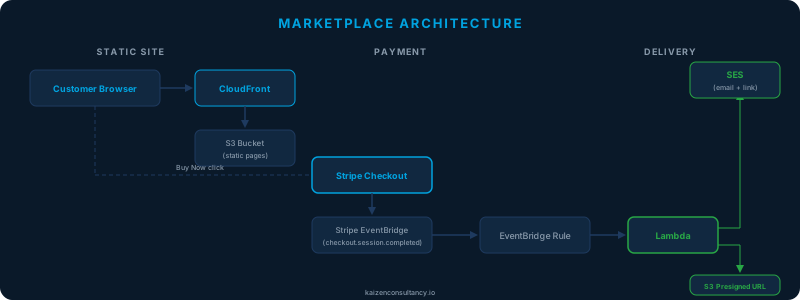
The marketplace sells PDF guides, consultancy services, training workshops, and software products. The architecture has three layers, and none of them involve a server.
Static site - marketplace pages are plain HTML on S3 behind CloudFront. The “Buy Now” button is a link to Stripe. That is the entire frontend.
Payment - Stripe handles checkout, card processing, and PCI compliance. We never touch payment data.
Delivery - when payment completes, Stripe fires an event through Amazon EventBridge. A Lambda function picks it up, identifies the product, generates a time-limited download link from a private S3 bucket, and emails it to the customer via SES. The whole thing takes under 10 seconds.
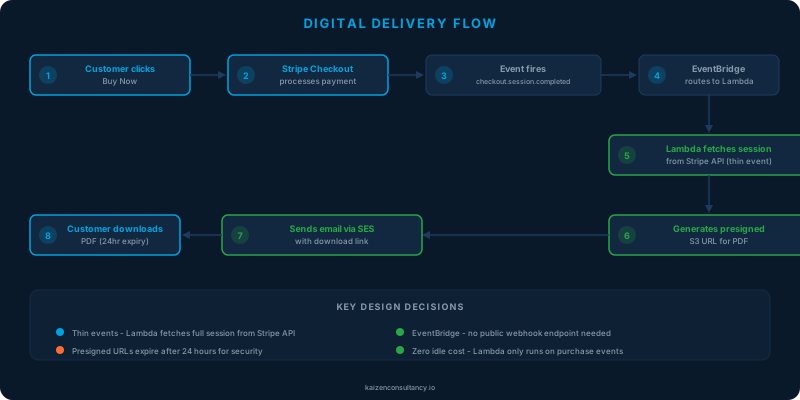
Every component is managed and serverless. Nothing to patch, nothing to scale, nothing to monitor at 3am. The system either works or it does not - and if it does not, the retry mechanisms built into EventBridge and Lambda handle it without intervention.
Why EventBridge instead of webhooks
This is the decision that makes experienced engineers raise an eyebrow - and then nod slowly when they understand why.
The traditional Stripe integration uses webhooks: Stripe POSTs to your endpoint, you verify the signature, parse the payload, handle retries, manage idempotency, and maintain a publicly accessible URL that anyone on the internet can probe. That means API Gateway, authentication, and the inevitable “why is my webhook returning 502” debugging session.
Stripe has a native EventBridge integration. Instead of webhooks, Stripe publishes events directly to a partner event bus in your AWS account. The Terraform is three resources:
resource "aws_cloudwatch_event_bus" "stripe" {
  name              = var.stripe_event_source
  event_source_name = var.stripe_event_source
}

resource "aws_cloudwatch_event_rule" "checkout_completed" {
  name           = "stripe-checkout-completed"
  event_bus_name = aws_cloudwatch_event_bus.stripe.name

  event_pattern = jsonencode({
    detail-type = ["checkout.session.completed"]
  })
}

resource "aws_cloudwatch_event_target" "delivery_lambda" {
  rule           = aws_cloudwatch_event_rule.checkout_completed.name
  event_bus_name = aws_cloudwatch_event_bus.stripe.name
  arn            = aws_lambda_function.delivery.arn
}
No API Gateway. No public endpoint. No webhook signature verification. Events arrive through AWS’s internal infrastructure, so the attack surface for the payment processing flow is zero. You configure it in the Stripe dashboard by pasting your AWS account ID and region - Stripe creates the partner event source, you associate it in Terraform, done.
The thin event catch
EventBridge receives “thin events” from Stripe - the event type and object ID, but not the full payload. A checkout.session.completed event does not include line items or customer details. The Lambda needs to call the Stripe API to fetch the full session:
url = f"https://api.stripe.com/v1/checkout/sessions/{session_id}?expand[]=line_items"
req = Request(url)
credentials = base64.b64encode(f"{stripe_key}:".encode()).decode()
req.add_header("Authorization", f"Basic {credentials}")

with urlopen(req) as resp:
    full_session = json.loads(resp.read().decode())
This is actually a security feature - you always work with authoritative data from Stripe rather than a potentially stale event payload. The API key lives in SSM Parameter Store as a SecureString, fetched at runtime and cached in memory. It never appears in environment variables, code, or Terraform state.
Four delivery flows, one Lambda
The handler routes products to different email flows based on type. A dictionary maps Stripe product IDs to S3 keys and delivery logic:
| Product Type | What Happens After Payment |
|---|---|
| Digital download | Presigned S3 URL emailed (24hr expiry) |
| Consultation | Intake form PDF emailed for pre-session preparation |
| Training workshop | Setup checklist emailed with software to install before the day |
| Software licence | Deployment guide + source code download link emailed |
| Bundle | Multiple flows triggered from a single checkout |
Each flow has a branded HTML email template with inline styles, a plain text fallback, and a clear call-to-action. The emails look professional because email clients in 2026 still cannot handle a <link> tag, so every style is inline. We are not bitter about this at all.
Bundle purchases iterate through component products and trigger the appropriate flow for each. One payment, multiple deliveries, zero manual intervention.
Security by absence
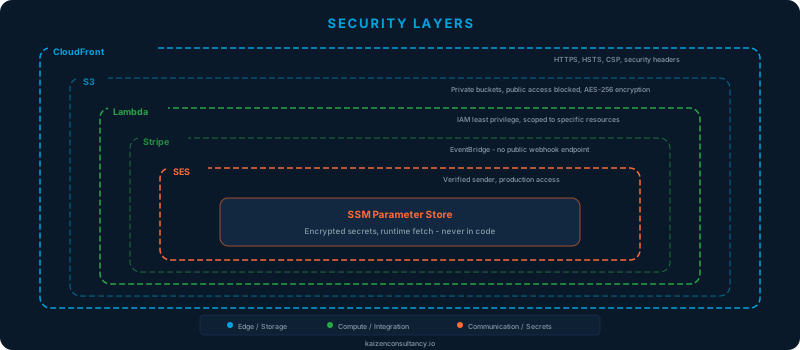
The security architecture is defined as much by what we did not include as by what we did.
What is there: CloudFront with HSTS, CSP, and security headers. Private S3 buckets with all four public access blocks. Lambda IAM scoped to specific resources - no wildcards, no *. SSM for secrets at runtime. SES with verified sender identity.
What is not there - and why:
| Service | Why We Skipped It |
|---|---|
| AWS WAF | No API endpoint to protect. Static HTML does not need a web application firewall. |
| Cognito | No user accounts. Pay, receive product, done. |
| DynamoDB | No state. Stripe is the order ledger. S3 is the product store. Lambda is stateless. |
| API Gateway | No API. EventBridge replaced the webhook endpoint entirely. |
Every service we excluded is a service we do not need to secure, monitor, patch, or pay for. The best security control is the one you do not need because the attack surface does not exist.
What it costs
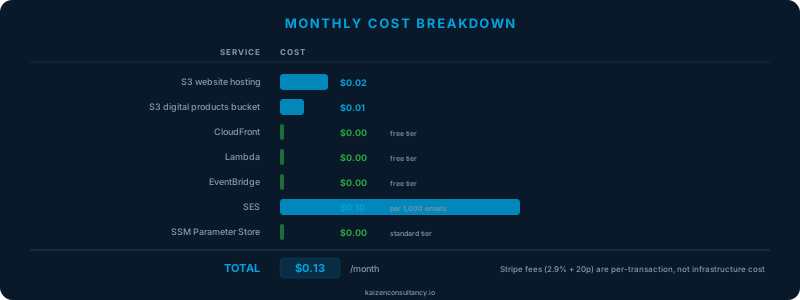
| Service | Monthly Cost | Notes |
|---|---|---|
| S3 (website + products) | ~$0.03 | Two buckets, minimal storage |
| CloudFront | $0.00 | Free tier: 1TB/month |
| Lambda | $0.00 | Free tier: 1M requests/month |
| EventBridge | $0.00 | Partner events are free |
| SES | ~$0.10 | Per 1,000 emails |
| SSM / CloudWatch | ~$0.00 | Standard tier, minimal logs |
| Total | ~$0.13/month |
For context: a t3.micro costs $8.50/month. A NAT Gateway costs $35/month. An ALB costs $18/month. We are running an e-commerce platform for less than the cost of a CloudWatch dashboard.
Stripe charges 2.9% + 20p per transaction, but that scales with revenue, not time. When nobody is buying, the infrastructure cost is thirteen pence. When sales spike, the per-transaction fees are covered by the revenue they generate. This is the serverless promise actually delivered.
The Terraform
The entire infrastructure is a single Terraform module:
| Resource | Purpose |
|---|---|
| S3 bucket + versioning + encryption + public access block + lifecycle | Private product storage with 30-day version expiry |
| SES identity | Verified sender email |
| IAM role + policy | Least-privilege: specific bucket, specific SES identity, specific SSM param, specific log group |
| CloudWatch log group | 30-day retention |
| Lambda function | Python 3.12, 128MB, 30s timeout |
| EventBridge bus + rule + target | Stripe partner source, checkout filter, Lambda invocation |
| Lambda permission | Allow EventBridge to invoke |
State in S3 with DynamoDB locking. Destroy and recreate from scratch in under 2 minutes.
The legal architecture
Digital products under UK consumer law have a specific wrinkle. The Consumer Contracts Regulations 2013 give buyers a 14-day cooling-off period - unless they consent to immediate delivery of digital content, which waives that right. We enforce this at three levels:
- Terms of Service - section 4a cites the regulation and states digital downloads are non-refundable once the link is issued
- Product pages - a visible notice above every Buy Now button
- Delivery mechanism - the link is issued automatically within seconds, constituting the delivery that triggers the waiver
Legal framework, user experience, and technical implementation aligned. Not because we are difficult - because we are thorough.
Well-Architected assessment
We designed this marketplace against the six pillars of the AWS Well-Architected Framework. Here is how each pillar maps to the architecture:
Operational excellence
Everything is in Terraform. The Lambda handler is versioned in Git. Deployments are a single terraform apply. CloudWatch logs have 30-day retention with structured logging that includes redacted customer emails and product names - enough to debug, not enough to leak PII. Adding a new product is a 15-minute checklist, not a project.
The operational burden is effectively zero. There are no servers to patch, no AMIs to rotate, no scaling policies to tune. The only operational task is monitoring the CloudWatch logs after a new product launch to confirm the delivery flow works - and even that is optional because the architecture is identical for every product.
Security
Covered in detail above, but the Well-Architected framing is worth stating explicitly:
- Identity and access management - Lambda IAM role scoped to specific ARNs. No wildcards. SSM parameter access restricted to the single key the Lambda needs.
- Detection - GuardDuty enabled at the account level (managed in a separate landing zone repo). CloudTrail logging all API activity.
- Infrastructure protection - no public endpoints. S3 buckets private with all four access blocks. CloudFront with TLS 1.2 minimum and security headers.
- Data protection - S3 encryption at rest (AES-256). Presigned URLs for time-limited access. Stripe API key in SSM SecureString, fetched at runtime.
- Incident response - CloudWatch alarms on Lambda errors. SES bounce handling via SNS. The irony of selling an incident response playbook while having an architecture simple enough to not need one is not lost on us.
Reliability
The architecture has no single points of failure that we control. CloudFront is globally distributed. S3 offers 11 nines of durability. Lambda runs across multiple Availability Zones automatically. EventBridge is a regional service with built-in redundancy. SES has automatic retry with exponential backoff.
The only external dependency is Stripe, and if Stripe is down, nobody is completing a checkout anyway - so the delivery Lambda simply has nothing to do. There is no failure mode where a customer pays but does not receive their product, because the payment and the delivery trigger are the same event. If the event does not arrive, the payment did not complete.
If the Lambda fails (bad code, SSM timeout, SES throttle), EventBridge retries with exponential backoff for up to 24 hours. The customer might wait a few minutes instead of a few seconds, but they will get their email.
Performance efficiency
Lambda is configured at 128MB - the minimum. The handler fetches a session from Stripe, generates a presigned URL, and sends an email. It does not need more memory. Cold starts are under 600ms (Python 3.12 with no external dependencies beyond boto3 and urllib). Warm invocations complete in under 300ms.
We deliberately avoided over-engineering the compute layer. There is no container, no Fargate task, no ECS service. The Lambda runs for less than a second per invocation and then disappears. The cost per invocation is approximately $0.0000002. We would need to process roughly 5 million purchases before the Lambda compute cost exceeds $1.
Cost optimisation
Covered in the cost section above, but the Well-Architected principle worth highlighting is pay only for what you consume. Every service in this architecture is priced per-request or within the free tier. When nobody is buying, the cost is thirteen pence. When sales spike, the marginal cost per transaction is fractions of a penny. There is no baseline cost that runs whether or not the marketplace is generating revenue.
This is the fundamental difference between serverless and traditional architectures. A t3.micro running 24/7 costs $8.50/month whether it processes zero transactions or ten thousand. Our Lambda costs nothing until someone buys something.
Sustainability
Minimal compute footprint. Lambda runs for under a second per transaction and then releases all resources. No idle servers consuming energy. CloudFront serves cached content from edge locations, reducing data transfer. S3 lifecycle policies expire old object versions after 30 days, preventing unbounded storage growth.
The sustainability pillar is often treated as an afterthought, but serverless architectures are inherently more sustainable than always-on alternatives. Shared infrastructure, high utilisation rates, and pay-per-use pricing align economic incentives with environmental ones.
How we actually built it
This marketplace was built using Kiro, an AI-powered IDE, with Stripe’s MCP server integration for product management. The workflow looked like this:
- Designed the Lambda handler and Terraform module
- Created Stripe products, prices, and payment links via MCP tools - directly from the IDE, no dashboard clicking
- Built the marketplace pages with consistent sidebar navigation
- Deployed the Lambda via
terraform apply - Uploaded assets to S3, pages to the website bucket, invalidated CloudFront
- Tested with a real purchase, found the thin event bug, fixed it, redeployed
The Kiro steering file (.kiro/steering/project.md) carries persistent context across every conversation - AWS account IDs, bucket names, deployment conventions, British English rules, the lot. Without it, every interaction starts from “what is the S3 bucket name?” With it, the AI knows the entire project context and can make changes across multiple files consistently.
The Stripe MCP integration was particularly effective. Creating a product, setting a price, and generating a payment link is three tool calls. The limitation - MCP tools cannot set after_completion redirect URLs - was the only point where we dropped to curl.
The PDF delivery pipeline
The digital products are HTML documents with a custom design system - branded cover pages, callout boxes, code blocks, diagrams, tables, and checklists. Chrome headless converts them to PDF for delivery:
chrome --headless=new --no-pdf-header-footer --print-to-pdf=output.pdf source.html
The HTML source files are version-controlled. The PDFs are generated artefacts. If we update a guide, we regenerate the PDF, upload it to S3, and the next customer who purchases gets the updated version automatically. No deployment required - just an S3 upload.
The design system ensures every guide looks consistent: Inter font, dark gradient cover, blue accent headings, green tip boxes, orange warning boxes, branded footer. One brand, one system, zero design drift.
Lessons learned the hard way
Thin events are not obvious. Our first live purchase failed silently. The Lambda received the event, found no line items, returned 200. We had to add the Stripe API fetch. It is documented, but easy to miss if you are used to webhook payloads.
Restricted keys are restricted. The initial SSM parameter had a restricted key (rk_live_*). It could create products but returned 401 when reading checkout sessions. The Lambda needs a full secret key (sk_live_*). Twenty seconds of debugging, one character prefix.
Chrome headless leaks file paths. The old flags (--headless --print-to-pdf-no-header) embed the local file path in the PDF footer. Customers would see /Users/martyn/gitrepos/... on every page. The fix: --headless=new --no-pdf-header-footer. Small detail, significant when you are selling the output.
Cache your SSM lookups. Without caching, every Lambda invocation calls SSM. A module-level variable that persists across warm invocations reduces SSM calls by 90%+. Cold starts fetch; warm invocations use the cache.
MCP tools have limits. Stripe’s MCP integration created 15 products with prices and payment links in minutes. But it cannot set after_completion redirect URLs on payment links. Know your tools before you commit to a workflow.
Coming soon: the full catalogue
The PDF guides are live now. The same Lambda, the same EventBridge integration, and the same SES pipeline will power everything else when it launches.
Consultancy
| Product | What You Get |
|---|---|
| 1-Hour Cloud Consultation | Focused session with a senior cloud engineer. Architecture, migration, cost, security - whatever you need, distilled into one actionable hour. |
| Well-Architected Review | Your AWS environment reviewed against all six pillars. Prioritised findings with specific remediation steps, not a generic checklist. |
| Migration Assessment | 7-day deep dive. Workload analysis, dependency mapping, cost projections, and a phased roadmap for up to 10 applications. A plan you can execute, not a deck you file away. |
Training workshops
| Workshop | Duration | What You Walk Away With |
|---|---|---|
| AWS Fundamentals | Half day | Confidence with core services, IAM, networking, and cost management |
| Terraform Bootcamp | Full day | Real infrastructure deployed. HCL, state, modules, CI/CD - hands on keyboard |
| Git for Operations | Full day | Branching, merging, and team workflows for ops teams who have been avoiding Git |
| DevOps and CI/CD | Full day | Production pipelines. Docker, testing, deployment strategies that actually work |
| Cloud Security Essentials | Half day | IAM, network security, encryption, and incident response - the practical bits |
| AI for Business Leaders | Half day | Real use cases, real costs, real risks. No hype, no buzzword bingo |
Software
| Product | What It Does |
|---|---|
| AWS Migration Tracker | Full-stack tracking for AWS migrations. Dashboards, Grafana analytics, task templates. Built for MAP engagements. |
| RACI Matrix Manager | Responsibility assignments without the spreadsheet. Because every organisation needs a RACI and nobody wants to maintain one in Excel. |
Bundles
| Bundle | Components | The Logic |
|---|---|---|
| Migration Assessment + Tracker | 7-day assessment + tracking platform | Plan the migration, then track execution. One package, one price. |
| Terraform + DevOps 2-Day | Terraform Bootcamp + DevOps Workshop | Day one: build the infrastructure. Day two: automate the deployment. |
Adding a new product to any category takes about 15 minutes: create the Stripe product, add the routing entry, upload the deliverable, create the marketplace page, deploy. The architecture does not care what you are selling - it cares about the event and the delivery flow.
What happens when it scales
The question every architect asks: “what happens when traffic grows?” Here is the answer:
| Monthly Sales | Revenue | Stripe Fees | AWS Infrastructure | Profit Margin |
|---|---|---|---|---|
| 10 | £13.00 | ~£2.90 | ~$0.13 | 77% |
| 100 | £130.00 | ~£29.00 | ~$0.23 | 77% |
| 1,000 | £1,300.00 | ~£290.00 | ~$1.30 | 77% |
| 10,000 | £13,000.00 | ~£2,900.00 | ~$4.50 | 77% |
At 10,000 sales per month, the infrastructure cost is $4.50. The revenue is £13,000. The ratio of infrastructure cost to revenue is 0.03%. The Lambda would use roughly 1% of its free tier allocation. EventBridge would still be free. SES would cost about $1 for the emails. The S3 presigned URL generation adds nothing measurable.
The profit margin stays flat at 77% regardless of volume because Stripe’s percentage fee dominates the cost structure. The infrastructure cost is so small it is a rounding error at every scale. There is no point at which you need to “upgrade” to a bigger server, add a load balancer, or provision a database. The architecture is the same at 10 sales as it is at 10,000.
This is not theoretical. Every component has been tested against AWS’s published limits. Lambda supports 1,000 concurrent executions by default. EventBridge can handle thousands of events per second. SES can send 200 emails per second in production mode. The ceiling is so far above any realistic sales volume that capacity planning is not a conversation worth having.
Disaster recovery in 5 minutes
The entire marketplace can be rebuilt from scratch in under 5 minutes. Not restored from a backup. Not recovered from a snapshot. Rebuilt from nothing.
Here is the recovery plan:
terraform apply- provisions the S3 bucket, Lambda, EventBridge, SES identity, IAM roles, and CloudWatch log group (~2 minutes)- Upload PDFs to S3 -
aws s3 syncthe product files to the delivery bucket (~30 seconds) - Deploy marketplace pages -
aws s3 syncthe HTML to the website bucket, invalidate CloudFront (~1 minute)
That is it. There is no database to restore. There is no application state to recover. There are no snapshots to find in a backup vault. The Git repository is the disaster recovery plan. Terraform state is in S3 with versioning. The product files are in a versioned S3 bucket. The Lambda code is zipped from the repo at apply time.
The order history lives in Stripe. The subscriber list lives in DynamoDB with point-in-time recovery. The product files are versioned in S3. Every piece of state that matters is either in a managed service with its own durability guarantees or in version control.
Compare this to a traditional e-commerce platform where disaster recovery means restoring a database from a point-in-time snapshot, redeploying application servers, warming caches, verifying data consistency, and hoping the backup was not corrupted. We have seen DR tests take days. Ours takes less time than making a cup of tea.
How this compares to the alternatives
We could have used an off-the-shelf platform. Here is what that would have cost:
| Platform | Monthly Cost | Transaction Fees | What You Get | What You Give Up |
|---|---|---|---|---|
| Shopify Basic | $39/month | 2.9% + 30c | Hosted storefront, payment processing, basic analytics | Control, customisation, data ownership |
| WooCommerce | $20-50/month (hosting) | Payment gateway fees | Self-hosted, full control, plugin ecosystem | Maintenance burden, security patching, scaling headaches |
| Gumroad | $0/month | 10% of revenue | Simple digital sales, hosted checkout | 10% of every sale, limited branding, platform dependency |
| Lemon Squeezy | $0/month | 5% + 50c | Digital sales, tax handling, hosted checkout | 5% of every sale, limited customisation |
| This architecture | $0.13/month | 2.9% + 20p (Stripe) | Full control, custom branding, automated delivery, own your data | You have to build it |
Shopify costs $39/month whether you sell anything or not. At zero sales, that is $39 of pure overhead. Our architecture costs 13 cents. At 100 sales per month on Gumroad, you would pay $13 in platform fees. On our architecture, the infrastructure cost for those 100 sales is 23 cents.
The trade-off is build time. We had to write the Lambda, the Terraform, the email templates, and the marketplace pages. That is a one-time investment. The ongoing cost advantage compounds every month. After 12 months, Shopify has cost $468 in platform fees alone. Our infrastructure has cost $1.56.
The other trade-off is maintenance. Shopify handles updates, security patches, and scaling for you. We handle nothing, because there is nothing to handle. Lambda is patched by AWS. S3 is managed by AWS. EventBridge is managed by AWS. The only code we maintain is the Lambda handler - 650 lines of Python that routes products to email templates. It changes when we add a product, which is a 2-line dictionary update.
For a consultancy selling digital products, the economics are not close.
The takeaway
You do not need a platform team, a microservices architecture, or a six-figure budget to sell products online. Stripe for payments, EventBridge for events, Lambda for logic, SES for email, S3 for storage. Thirteen pence a month.
The hardest part was not the architecture. It was getting Chrome to stop printing the local file path in the PDF footer.
That is dysfunctional lazy engineering at its finest.
One more thing: the subscribe button
You might have noticed the subscribe form at the bottom of this page. That is also serverless, also Terraform, and also costs essentially nothing.
The architecture: API Gateway (HTTP API) receives the POST from the blog, invokes a Lambda that writes to DynamoDB, sends a double opt-in confirmation email via SES, and waits for the click. Confirmed subscribers get new posts delivered to their inbox. The Lambda handles subscribe, confirm, and unsubscribe from a single function, routing on the API path.
The interesting bits:
- Double opt-in - every subscription requires email confirmation. No confirmed click, no emails. This is a GDPR requirement and also prevents abuse.
- Suppression list - a separate DynamoDB table tracks emails that must never be contacted again (bounces, complaints). The send Lambda checks suppression before every email. Records never expire.
- Bounce and complaint handling - SES publishes bounce and complaint notifications to SNS topics, which invoke the Lambda to automatically suppress the offending address. If someone marks us as spam, they are immediately and permanently removed. No manual intervention.
- Rate limiting - API Gateway throttles at 5 requests per second with a burst of 10. Enough for legitimate use, not enough for abuse.
- DynamoDB on-demand - pay-per-request billing. Zero cost when nobody is subscribing. Point-in-time recovery enabled for data protection.
- CORS locked down - the API only accepts requests from
kaizenconsultancy.io. No cross-origin abuse.
The newsletter send Lambda fetches the blog RSS feed, identifies new posts, scans the subscribers table, checks each address against the suppression list, and sends personalised emails with an unsubscribe link unique to each subscriber. One Lambda invocation, one DynamoDB scan, one SES call per subscriber.
Total additional infrastructure cost: effectively zero. DynamoDB on-demand with a handful of records costs nothing measurable. API Gateway’s free tier covers 1 million requests per month. The Lambda runs for a few seconds per newsletter send.
The subscribe form below this post is the proof. Try it - you will get a confirmation email within seconds, and every new blog post will land in your inbox. If you do not like it, the unsubscribe link is one click and permanent.
We built the marketplace delivery pipeline, the mailing list, and the blog on the same principles: event-driven, serverless, Terraform-managed, and priced per-request. The total infrastructure cost for all of it - marketplace, mailing list, blog, and the main website - is under $2 per month.
Two pounds. For everything.
Dysfunctional lazy engineering. We will keep saying it until it stops being true.