Most newsletter platforms charge £16 or more per month for a thousand subscribers. Ours costs about 15p. Here is how we built it, why we made the choices we did, and what it looks like under the hood.
TL;DR for non-techies
If you have subscribed to our blog (or are thinking about it), here is what happens behind the scenes. You enter your email, we send you a confirmation link, and once you click it you are on the list. When we publish a new post, you get an email with a summary and a link. That is it. No tracking pixels, no marketing funnels, no selling your data to advertisers.
Your email is stored in a database in London (not the US), encrypted at rest, and deleted the instant you unsubscribe. The whole system runs on Amazon Web Services and costs us roughly 15 pence a month. For context, Mailchimp would charge us around £16 a month for the same thing.
We built it this way because we wanted full control over subscriber data, UK data residency for GDPR compliance, and zero ongoing cost that scales with list size. And because we are cloud engineers - if we cannot build our own newsletter system, why would you trust us to build yours?
Now, for the technical deep dive.
Architecture Overview
The newsletter system is a Terraform module that provisions six AWS services, all in eu-west-2 (London):
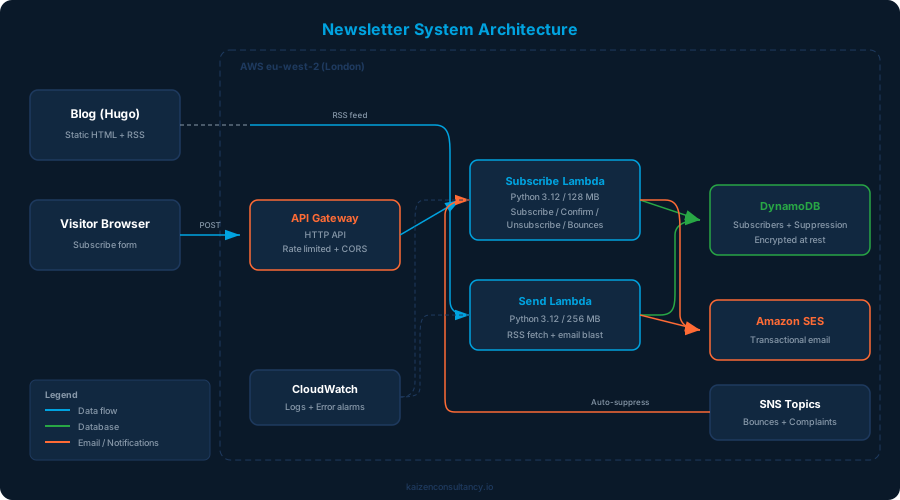
The components:
- API Gateway (HTTP API) - public endpoint for subscribe, confirm, and unsubscribe requests. Rate limited and CORS-locked to our domain.
- Subscribe Lambda - Python 3.12 function handling the subscriber lifecycle: new subscriptions, email confirmation, unsubscribe, and SES bounce/complaint processing.
- Send Lambda - separate function that fetches the blog RSS feed, checks for new posts, and emails all confirmed subscribers.
- DynamoDB - two tables. One for subscribers (with GSIs for token lookups), one for the permanent suppression list.
- Amazon SES - transactional email service for confirmation emails and newsletter delivery.
- SNS - two topics that receive SES bounce and complaint notifications, routing them back to the Subscribe Lambda for automatic handling.
- CloudWatch - log groups with 30-day retention, plus alarms for Lambda errors and DynamoDB throttling.
Everything is defined in a single Terraform module at infra/terraform/modules/mailing-list/. No console clicks, no manual configuration, no drift.
The Subscribe Flow
The journey from “enter your email” to “you are subscribed” has more steps than you might expect. Each one exists for a reason.
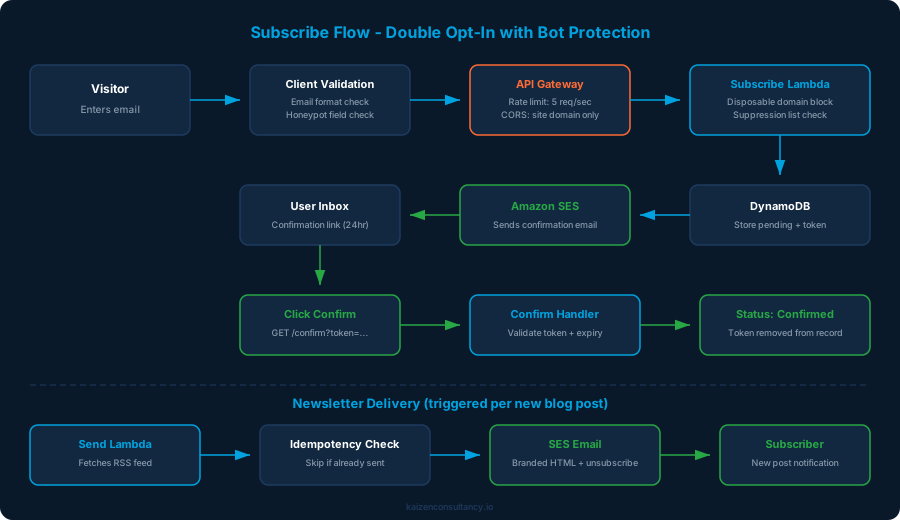
Step by step
Visitor enters their email in the subscribe form at the bottom of every blog post.
Client-side validation checks the email format with a regex and inspects the honeypot field (more on that in the security section).
API Gateway receives the POST request. It enforces a rate limit of 5 requests per second with a burst of 10, and CORS headers restrict requests to
kaizenconsultancy.ioonly.Subscribe Lambda runs server-side validation: stricter email regex, 254-character limit, disposable domain blocking, and a suppression list check.
DynamoDB stores the subscriber as “pending” with a cryptographically random confirmation token and a separate unsubscribe token.
SES sends a branded confirmation email with a single “Confirm Subscription” button. The link expires after 24 hours.
The visitor clicks the link, which hits the
/confirmendpoint on API Gateway.Subscribe Lambda validates the token, checks it has not expired, updates the subscriber status to “confirmed”, and removes the confirmation token from the record.
Done. The visitor sees a branded confirmation page and will receive an email whenever we publish a new post.
What happens when we publish
The Send Lambda is triggered (manually or via EventBridge schedule), fetches the blog RSS feed, identifies the latest post, and emails every confirmed subscriber. It is idempotent - each subscriber record tracks the last post they were sent, so running the Lambda twice for the same post sends zero duplicate emails.
The email includes a branded HTML template with the post title, description, a “Read the full post” button, and an unsubscribe link in the footer. Every email also includes a plain text version for clients that do not render HTML.
Seven Layers of Security
This is where it gets interesting. A subscribe form is a public endpoint that accepts user input - which makes it a target. We have seven layers of protection, from the browser all the way down to the database.
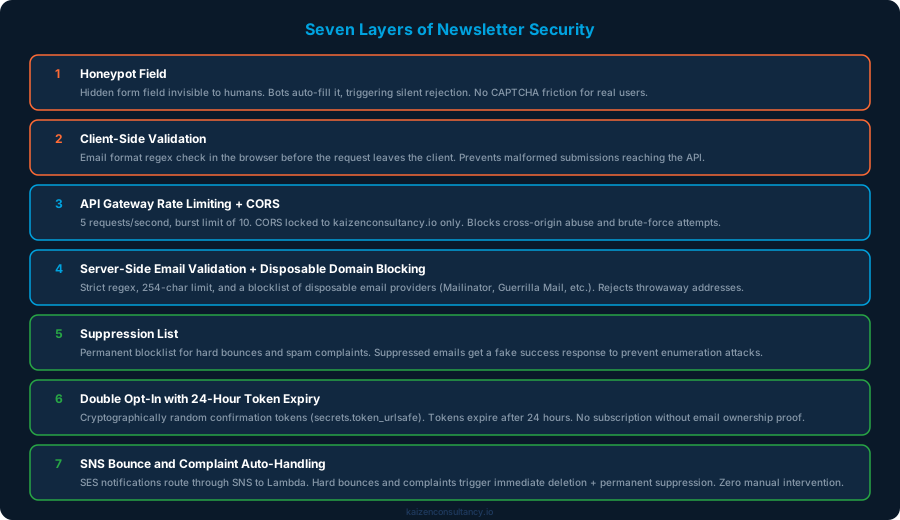
Layer 1: Honeypot field
The subscribe form includes a hidden field called “website”. It is invisible to humans (positioned off-screen with CSS) but bots that auto-fill every field will populate it. If the honeypot field has any value, the Lambda silently returns a fake success response. The bot thinks it subscribed. It did not.
This is more effective than CAPTCHA for simple forms because it adds zero friction for real users. No clicking traffic lights, no squinting at distorted text.
<!-- Hidden from humans, bots fill it in -->
<input type="text" name="website"
       style="position:absolute;left:-9999px;opacity:0;height:0;"
       tabindex="-1" autocomplete="off" aria-hidden="true">
Layer 2: Client-side validation
Before the request leaves the browser, JavaScript validates the email format with a regex. This catches typos and obviously invalid addresses without a round trip to the server.
Layer 3: API Gateway rate limiting and CORS
The API Gateway enforces two constraints:
- Rate limit: 5 requests per second, burst of 10. This prevents brute-force subscription attempts and abuse.
- CORS: only requests from
https://www.kaizenconsultancy.ioare accepted. Cross-origin requests from other domains are rejected.
cors_configuration {
  allow_origins = ["https://www.kaizenconsultancy.io"]
  allow_methods = ["POST", "GET"]
  allow_headers = ["Content-Type"]
  max_age       = 86400
}

default_route_settings {
  throttling_burst_limit = 10
  throttling_rate_limit  = 5
}
Layer 4: Server-side validation and disposable domain blocking
The Lambda applies its own validation, independent of the client:
- Strict email regex (not the same as the client-side one)
- Maximum length of 254 characters (the RFC 5321 limit)
- A blocklist of disposable email providers: Mailinator, Guerrilla Mail, Yopmail, Temp Mail, and others
Disposable domains are rejected because they are almost exclusively used by bots and abuse scripts. A real subscriber uses a real email address.
Layer 5: Suppression list
A separate DynamoDB table acts as a permanent suppression list. Emails land here for two reasons: SES reported a hard bounce, or SES received a spam complaint. Once suppressed, an email can never be re-subscribed.
The clever bit: if a suppressed email tries to subscribe, the Lambda returns the same success message as a normal subscription. This prevents enumeration attacks - an attacker cannot determine which emails are on the suppression list by observing different responses.
if is_suppressed(email):
    # Don't reveal suppression - return success to prevent enumeration
    return response(200, {"message": "Thank you. Please check your email to confirm."})
Layer 6: Double opt-in with 24-hour token expiry
No subscription is active until the visitor confirms via email. The confirmation token is generated with Python’s secrets.token_urlsafe(32) - cryptographically random, 32 bytes of entropy. The token expires after 24 hours. After confirmation, the token is removed from the database record entirely.
This prevents:
- Someone subscribing an email address they do not own
- Stale pending records accumulating indefinitely
- Token reuse after confirmation
Layer 7: SNS bounce and complaint auto-handling
When SES encounters a hard bounce (invalid mailbox, domain does not exist) or receives a spam complaint, it publishes a notification to an SNS topic. That topic triggers the Subscribe Lambda, which:
- Deletes the subscriber record from DynamoDB
- Adds the email to the permanent suppression list
- Logs the action (with the email redacted)
This is fully automatic. No manual list cleaning, no checking bounce reports, no risk of sending to addresses that have complained. SES reputation stays clean.
Bonus: Email redaction in logs
Every log entry that mentions an email address redacts it: ma***@example.com. This means CloudWatch logs never contain full subscriber email addresses, even if someone gains read access to the logs.
def redact_email(email):
    if not email or "@" not in email:
        return "[redacted]"
    local, domain = email.split("@", 1)
    return f"{local[:2]}***@{domain}"
GDPR Compliance
This is not just a technical exercise. As a UK company, we are subject to UK GDPR, and the newsletter handles personal data (email addresses). Here is how we comply:
- Lawful basis: consent, via double opt-in. No pre-ticked boxes, no implied consent.
- Data minimisation: we store only the email address, subscription status, and tokens. No names, no IP addresses, no tracking data.
- Data residency: everything is in
eu-west-2(London). DynamoDB, Lambda, SES, API Gateway - all in the UK. No data leaves the country. - Right to erasure: when someone unsubscribes, their record is deleted from DynamoDB. Not marked as inactive, not soft-deleted - gone. The unsubscribe confirmation page explicitly states this.
- Encryption at rest: DynamoDB server-side encryption is enabled on both tables.
- Encryption in transit: all API Gateway endpoints are HTTPS only. SES uses TLS for email delivery.
- Privacy policy: the subscribe form links directly to our privacy policy, which documents what data is collected, how it is stored, and how to request deletion.
- No third-party data sharing: subscriber emails are never sent to any external service. No analytics platforms, no advertising networks, no data brokers.
Well-Architected Framework Assessment
We designed this system against all six pillars of the AWS Well-Architected Framework. Here is how it scores.
1. Operational Excellence
- Infrastructure as Code: the entire module is a single Terraform file.
terraform applycreates everything;terraform destroyremoves everything. - Tagging: every resource has
Name,Environment, andManagedBytags. - Logging: both Lambdas write to dedicated CloudWatch log groups with 30-day retention.
- Monitoring: CloudWatch alarms fire on Lambda errors (threshold: 5 in 5 minutes) and DynamoDB write throttling (threshold: 10 in 5 minutes).
- Idempotent operations: the Send Lambda tracks which posts have been sent to each subscriber. Running it twice is safe.
2. Security
Covered in detail above, but the highlights:
- Seven layers of input validation and abuse prevention
- IAM least privilege - the Lambda role can only access its own log groups, its own DynamoDB tables, and send email from one verified identity
- No wildcard permissions anywhere in the IAM policy
- Encryption at rest (DynamoDB) and in transit (HTTPS, TLS)
- Email redaction in all log output
- Anti-enumeration responses for suppressed emails
# IAM policy - no wildcards, scoped to specific resources
{
  Effect = "Allow"
  Action = ["ses:SendEmail", "ses:SendRawEmail"]
  Resource = "arn:aws:ses:eu-west-2:*:identity/martyn@kaizenconsultancy.io"
}
3. Reliability
- No servers to fail: Lambda and DynamoDB are fully managed. No patching, no capacity planning, no 3am pages.
- DynamoDB point-in-time recovery: enabled on the subscribers table. We can restore to any second in the last 35 days.
- Automatic bounce handling: bad addresses are removed automatically, keeping the subscriber list clean and SES reputation healthy.
- Graceful degradation: if the Send Lambda fails mid-run, the idempotency tracking means it can be re-run safely. Subscribers who already received the email will not get a duplicate.
4. Performance Efficiency
- Right-sized Lambda: the Subscribe Lambda runs at 128 MB with a 10-second timeout. It processes a single request and returns. The Send Lambda gets 256 MB and 5 minutes because it scans the subscriber table and sends multiple emails.
- DynamoDB on-demand: pay-per-request billing means zero cost when idle and automatic scaling under load. No provisioned capacity to guess at.
- GSI for token lookups: confirmation and unsubscribe tokens are queried via Global Secondary Indexes, not table scans. O(1) lookups regardless of table size.
- SES rate management: the Send Lambda includes a 100ms sleep between emails to stay well within SES sending limits.
5. Cost Optimisation
This is where it gets fun.
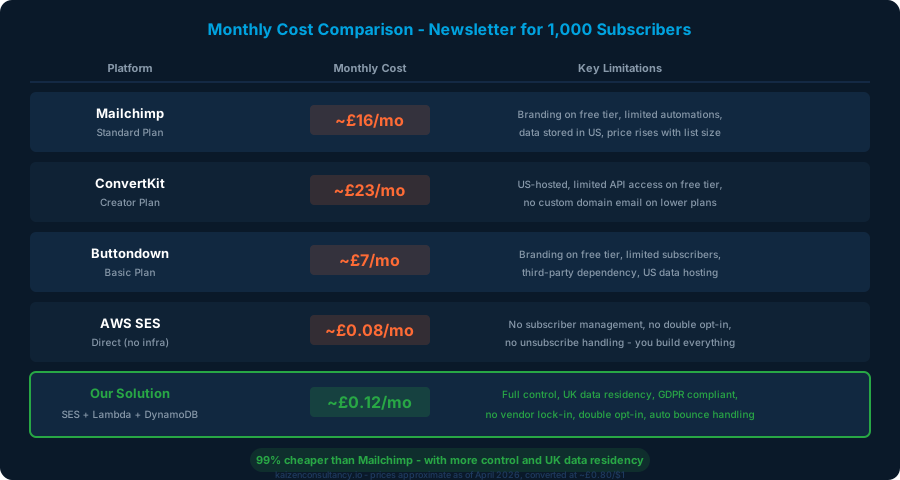
Here is what our newsletter actually costs for 1,000 subscribers receiving one email per month:
| Resource | Monthly Cost |
|---|---|
| DynamoDB (on-demand, ~1,000 items) | ~£0.00 |
| Lambda invocations (~1,050/month) | ~£0.00 |
| SES emails (~1,050/month at ~8p/1,000) | ~£0.09 |
| API Gateway requests (~200/month) | ~£0.00 |
| CloudWatch logs (minimal) | ~£0.00 |
| SNS notifications | ~£0.00 |
| Total | ~£0.12/month |
For comparison:
| Platform | 1,000 subscribers | 5,000 subscribers | 10,000 subscribers |
|---|---|---|---|
| Mailchimp (Standard) | ~£16/mo | ~£48/mo | ~£80/mo |
| ConvertKit (Creator) | ~£23/mo | ~£63/mo | ~£95/mo |
| Buttondown (Basic) | ~£7/mo | ~£31/mo | ~£63/mo |
| Our solution | ~£0.12/mo | ~£0.48/mo | ~£0.88/mo |
At 10,000 subscribers, Mailchimp costs around £80 per month. Our solution costs about 88p. That is a 99% saving.
The cost scales linearly with SES email volume (~8p per 1,000 emails). DynamoDB on-demand pricing is effectively free at this scale. Lambda free tier covers 1 million requests per month. API Gateway free tier covers 1 million requests in the first 12 months, then about 80p per million after that.
The trade-off: we built and maintain the system ourselves. There is no drag-and-drop template editor, no A/B testing, no subscriber analytics dashboard. For a blog newsletter that sends one email per new post, we do not need any of that. If we did, the build-vs-buy calculation would be different.
6. Sustainability
- Zero idle compute: Lambda functions only run when invoked. Between blog posts, the system consumes no compute resources at all.
- Minimal data storage: we store only what is necessary (email, status, tokens). No analytics data, no click tracking, no open tracking.
- 30-day log retention: CloudWatch logs are automatically deleted after 30 days, preventing unbounded storage growth.
- Right-sized resources: 128 MB Lambda for request handling, 256 MB for batch sending. No over-provisioning.
What We Deliberately Left Out
Not every feature is worth building. Here is what we skipped and why:
- Open/click tracking: requires embedding tracking pixels and redirect links. Adds complexity, raises privacy concerns, and provides vanity metrics we would not act on. If people read the post, great. If they do not, the content needs to be better - a tracking pixel will not tell us why.
- Subscriber analytics dashboard: for a blog with a handful of posts per month, checking the DynamoDB table directly is sufficient. A dashboard would be over-engineering.
- A/B subject line testing: we send one email per post. There is no variant to test.
- Rich HTML template editor: the email template is hardcoded in the Lambda. It is branded, responsive, and includes both HTML and plain text versions. Changing it means editing Python code, which is fine for our use case.
- Scheduled sending: the Send Lambda is triggered manually or via EventBridge. We publish infrequently enough that manual triggering is not a burden.
The Terraform
The entire system is defined in a single Terraform module. Here is a simplified view of the key resources:
# DynamoDB - subscribers with GSIs for token lookups
resource "aws_dynamodb_table" "subscribers" {
  name         = "kaizen-mailing-list"
  billing_mode = "PAY_PER_REQUEST"
  hash_key     = "email"

  global_secondary_index {
    name            = "confirm-token-index"
    hash_key        = "confirm_token"
    projection_type = "ALL"
  }

  point_in_time_recovery { enabled = true }
  server_side_encryption  { enabled = true }
}

# API Gateway - rate limited, CORS locked
resource "aws_apigatewayv2_api" "mailing_list" {
  name          = "kaizen-mailing-list"
  protocol_type = "HTTP"

  cors_configuration {
    allow_origins = ["https://www.kaizenconsultancy.io"]
    allow_methods = ["POST", "GET"]
    max_age       = 86400
  }
}

# Lambda - Python 3.12, minimal memory
resource "aws_lambda_function" "subscribe" {
  function_name = "kaizen-mailing-list-subscribe"
  runtime       = "python3.12"
  timeout       = 10
  memory_size   = 128
  handler       = "subscribe.lambda_handler"
}
terraform apply creates the lot. terraform destroy removes it. The entire newsletter system can be rebuilt from scratch in under two minutes.
Key Takeaways
You do not need Mailchimp. For a simple blog newsletter, AWS SES + Lambda + DynamoDB gives you full control at a fraction of the cost. The trade-off is building it yourself, but if you are already working in AWS, the effort is modest.
Security is not optional on public endpoints. A subscribe form is an invitation for abuse. Seven layers of protection - from honeypot fields to automatic bounce suppression - keep the system clean without manual intervention.
GDPR compliance is an architecture decision, not a checkbox. Choosing
eu-west-2for data residency, implementing immediate deletion on unsubscribe, and minimising stored data are all decisions made at design time, not bolted on afterwards.The Well-Architected Framework applies to small systems too. This newsletter module touches all six pillars. Applying the framework to a small system is good practice for when you need to apply it to a large one.
Build what you need, not what you might need. No tracking pixels, no analytics dashboard, no A/B testing. Every feature we left out is a feature we do not have to maintain, secure, or pay for.
If you want to see this system in action, scroll down. The subscribe form is right there.