Overview
The Cloud Migration Tracker is a self-hosted platform deployed into the customer’s own AWS account. Unlike SaaS products where the vendor controls the runtime, our licensing system must enforce entitlements on infrastructure we don’t own or operate. This creates a unique challenge: how do you prevent tampering when the customer has root access to the machine?
This post covers the full licensing architecture - from cryptographic validation to frontend feature gating - and the security measures that protect both the license system and the customer’s AWS credentials.
The Problem
Self-hosted software licensing has three fundamental challenges:
- The customer controls the database - they can
UPDATE license SET tier = 'unlimited' - The customer controls the code - they can modify the validation logic
- The customer controls the network - they can block outbound calls to the license server
Our system addresses all three with layered cryptographic controls, integrity verification, and a grace-period model that balances security with reliability.
Architecture
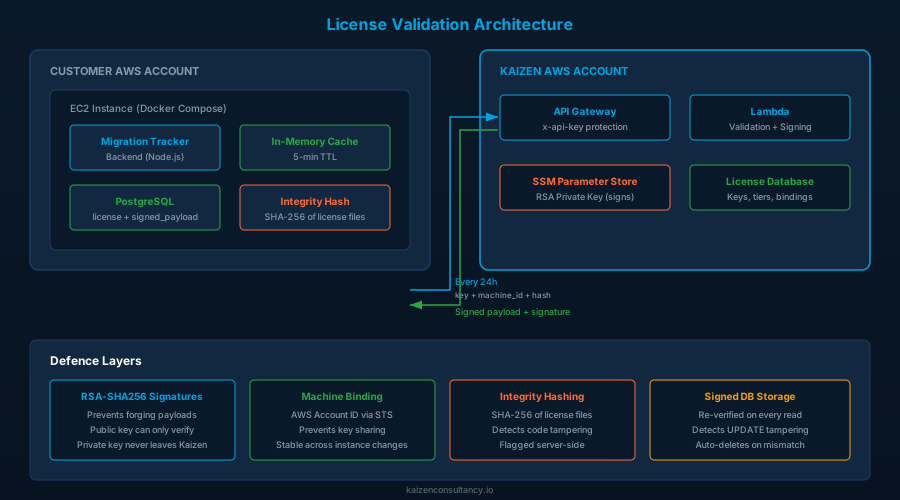
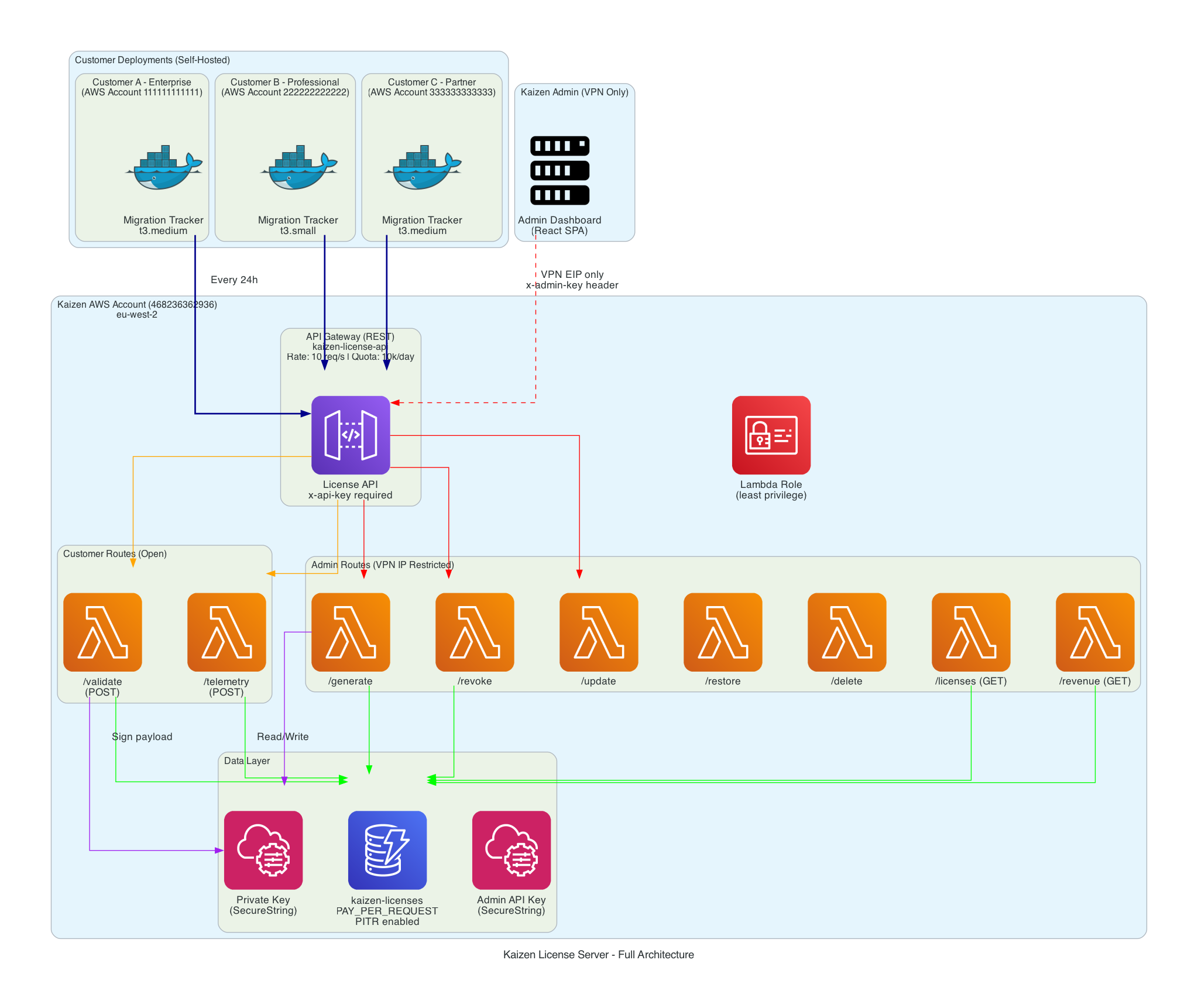
The license server runs entirely in the Kaizen AWS account as a serverless stack. Customer deployments communicate with it over HTTPS using a shared API key for cost protection.
Tier Model
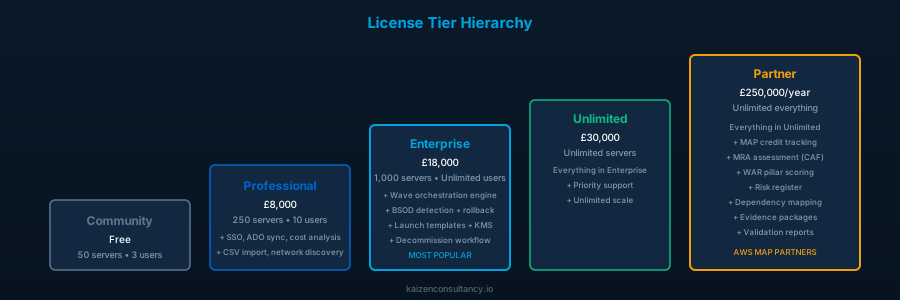
The platform enforces a hierarchy of feature tiers. Each tier unlocks capabilities and raises entity limits:
community < professional < enterprise < unlimited < partner
| Tier | Max Servers | Max Users | Max Waves | Max Templates |
|---|---|---|---|---|
| Community | 50 | 3 | 2 | 3 |
| Professional | 250 | 10 | Unlimited | Unlimited |
| Enterprise | 1,000 | Unlimited | Unlimited | Unlimited |
| Unlimited | Unlimited | Unlimited | Unlimited | Unlimited |
| Partner | Unlimited | Unlimited | Unlimited | Unlimited |
Community tier is the default when no license is activated. A 7-day trial period begins from the first user creation - after which login is blocked until a license key is entered.
Validation Flow
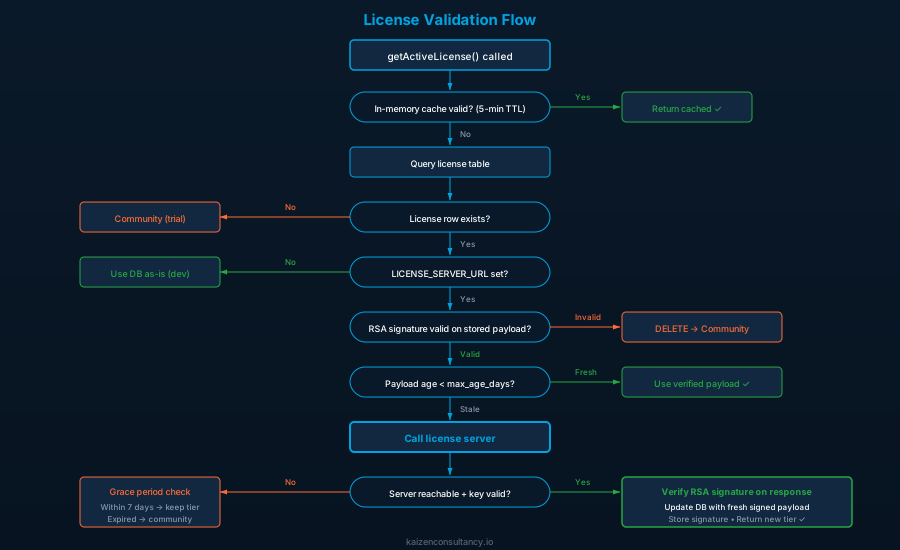
License validation occurs on application startup and every 24 hours thereafter. The flow has multiple decision points with fallback behaviour at each stage.
Caching Strategy
The system uses a two-level cache to minimise database queries and network calls:
- In-memory cache (5-minute TTL): Every call to
getActiveLicense()checks this first. Prevents hitting PostgreSQL on every API request. - Database cache (24-hour revalidation): The license row stores
last_validated_at. The server is only called when this timestamp is older than 24 hours.
This means in normal operation, the license server receives exactly one call per day per deployment.
Cryptographic Signature Verification
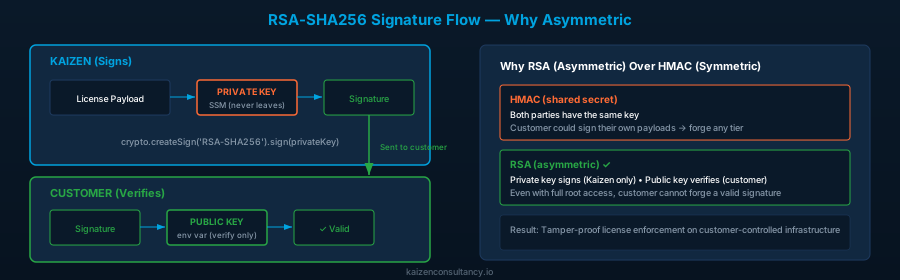
The license server signs every validation response with an RSA private key. The application verifies using the corresponding public key distributed via environment variable.
Why RSA (Asymmetric) Over HMAC (Symmetric)
With HMAC, both parties share the same secret - meaning the customer could sign their own payloads. With RSA:
- The private key stays in Kaizen’s SSM Parameter Store - never leaves our account
- The public key is distributed to every deployment - it can only verify, never sign
- Even with full access to the application code and environment variables, a customer cannot forge a valid license payload
Verification Implementation
function verifySignature(payload, signature) {
  if (!LICENSE_PUBLIC_KEY) return false;
  const verify = crypto.createVerify('RSA-SHA256');
  verify.update(JSON.stringify(payload));
  verify.end();
  return verify.verify(LICENSE_PUBLIC_KEY, signature, 'base64');
}
The payload is the JSON-serialised license object (tier, limits, customer name, expiry, validated_at, max_age_days). The signature is base64-encoded. Both are stored in the database after successful validation.
Tamper Detection on Read
Every time the license is read from the database, the application:
- Parses the stored
signed_payloadJSON - Re-verifies the RSA signature against it
- Compares
signed_payload.tier,signed_payload.max_servers, andsigned_payload.max_usersagainst the corresponding database columns
If either check fails, the license row is deleted and the application downgrades to community. This catches:
- Direct
UPDATEstatements against the license table - Database restore from a modified backup
- Any manipulation of the stored license data
Machine Binding
Each license key is bound to a specific deployment to prevent key sharing between customers.
Resolution Strategy
async function getMachineId() {
  if (cachedMachineId) return cachedMachineId;

  // Try AWS STS first  - returns the AWS account ID
  try {
    const sts = new STSClient({});
    const identity = await sts.send(new GetCallerIdentityCommand({}));
    if (identity.Account) {
      cachedMachineId = identity.Account;
      return cachedMachineId;
    }
  } catch (err) {
    // STS not available  - fall back
  }

  // Fallback: SHA-256 hash of DATABASE_URL + hostname
  const raw = (process.env.DATABASE_URL || '') + os.hostname();
  cachedMachineId = crypto.createHash('sha256').update(raw).digest('hex');
  return cachedMachineId;
}
The machine ID is:
- On AWS (production): The 12-digit AWS account ID via STS GetCallerIdentity
- Off AWS (development): A SHA-256 hash of the database connection string concatenated with the OS hostname
The machine ID is sent with every validation request. The license server records which machine ID activated a key and rejects attempts to use the same key from a different account.
Why Account-Level Binding
We bind to the AWS account ID rather than the EC2 instance ID because:
- Instances are ephemeral - they get replaced during updates, scaling, or recovery
- The AWS account is stable - it represents the customer’s environment
- It prevents sharing a key between two different customer accounts while allowing normal infrastructure operations within one account
Code Integrity Verification
The application hashes its own license-critical files on startup and sends the hash with every validation request.
function computeIntegrityHash() {
  const filesToHash = [
    path.join(__dirname, 'license.js'),
    path.join(__dirname, '..', 'routes', 'license.js'),
  ];
  const hash = crypto.createHash('sha256');
  for (const file of filesToHash) {
    if (fs.existsSync(file)) {
      hash.update(fs.readFileSync(file));
    }
  }
  integrityHash = hash.digest('hex');
}
The hash is computed once on module load and included in the validation payload:
{
  "license_key": "KAIZEN-XXXX-XXXX",
  "machine_id": "026090510591",
  "integrity_hash": "a3f2b8c1d4e5...",
  "app_version": "3.2.0"
}
The license server maintains a registry of known-good hashes (one per published version). If a deployment reports an unrecognised hash, it’s flagged for investigation - indicating the customer may have modified the license validation logic.
Production Obfuscation
In the production Docker build, license files are obfuscated before deployment:
RUN node scripts/obfuscate-license.js \
    && mv middleware/license.obfuscated.js middleware/license.js \
    && mv routes/license.obfuscated.js routes/license.js \
    && rm -rf scripts/obfuscate-license.js \
    && npm prune --omit=dev
Obfuscation settings:
- Control flow flattening (50% threshold): Restructures code logic into switch-case state machines
- Dead code injection (20% threshold): Inserts non-functional code paths
- String array encoding (base64, 50% threshold): Extracts string literals into an encoded array
- Target: Node.js
This is not a security boundary - obfuscation is reversible. The real protection comes from the RSA signatures and integrity hashing. Obfuscation raises the effort required for casual inspection.
Grace Period
The grace period ensures customers don’t lose access due to transient network issues, DNS problems, or license server maintenance.
Rules
| Scenario | Behaviour |
|---|---|
| License server unreachable (network timeout) | Continue at current tier for 7 days from last successful validation |
| License server explicitly rejects key (revoked/expired) | Continue at current tier for 7 days from last successful validation |
| Grace period expires (either scenario) | Downgrade to community tier |
License server never configured (LICENSE_SERVER_URL empty) | Use DB license as-is indefinitely (dev/offline mode) |
| First run, never validated, server unreachable | Continue at current tier (grace from epoch - effectively unlimited until first successful validation) |
Server-Controlled Grace via max_age_days
The signed payload includes a max_age_days field set by the license server. This allows the server to control how long a cached validation remains trusted:
const maxAgeDays = storedPayload.max_age_days || GRACE_PERIOD_DAYS;
const payloadAge = now - new Date(storedPayload.validated_at).getTime();
if (payloadAge > maxAgeDays * 24 * 60 * 60 * 1000) {
  // Force revalidation
}
For standard licenses, max_age_days is typically 7. For high-value or trial licenses, the server can set it to 1 - forcing daily check-ins.
Trial System
New deployments without a license key operate in a 7-day trial mode.
How Trial Start is Determined
const installResult = await pool.query('SELECT MIN(created_at) as install_date FROM users');
The trial starts from the earliest user creation timestamp - not from deployment time. This means:
- A freshly deployed instance with no users has no trial countdown
- The trial begins when the first user is created (typically during initial setup)
- After 7 days, login is blocked with a message directing the customer to purchase a license
Trial Enforcement
Trial expiry is checked on every login attempt:
if (trialStatus.expired) {
  return res.status(403).json({
    error: 'Trial expired',
    message: 'Your 7-day trial has expired. Please contact Kaizen Cloud Consultancy to purchase a license.',
    trial_expired: true,
    install_date: trialStatus.installDate,
  });
}
The frontend login page displays the trial status (days remaining) and the expiry message when blocked.
Telemetry
The application sends a usage heartbeat to the license server every 24 hours. This serves two purposes:
- Audit: Detect deployments exceeding their licensed limits
- Health: Confirm the deployment is active and operational
Payload Structure
{
  "license_key": "KAIZEN-XXXX-XXXX",
  "server_count": 142,
  "user_count": 8,
  "app_count": 23,
  "wave_count": 4,
  "tier_in_use": "professional",
  "uptime_hours": 168,
  "migration": {
    "apps_total": 23,
    "apps_completed": 12,
    "apps_in_progress": 6,
    "apps_pending": 5,
    "progress_pct": 52.2,
    "tasks_total": 184,
    "tasks_completed": 97,
    "tasks_in_progress": 34
  },
  "map": {
    "servers_migrated": 89,
    "servers_tagged": 85,
    "tag_compliance_pct": 96,
    "annual_arr": 142800.00
  }
}
What Is NOT Sent
- No server hostnames, IP addresses, or hardware details
- No application names or descriptions
- No user names, emails, or credentials
- No AWS credentials or account identifiers (beyond the machine_id already established)
- No task content, automation scripts, or business data
Delivery Guarantees
- Non-blocking: Telemetry is fire-and-forget. Failures are logged but never affect application functionality.
- Deduplicated: A timestamp check prevents sending more than once per 24-hour window.
- Timeout: 5-second abort signal prevents hanging on slow connections.
- Forced send on activation: When a license is first activated, telemetry is sent immediately (bypassing the interval check) so the license server has current usage data.
Feature Gating
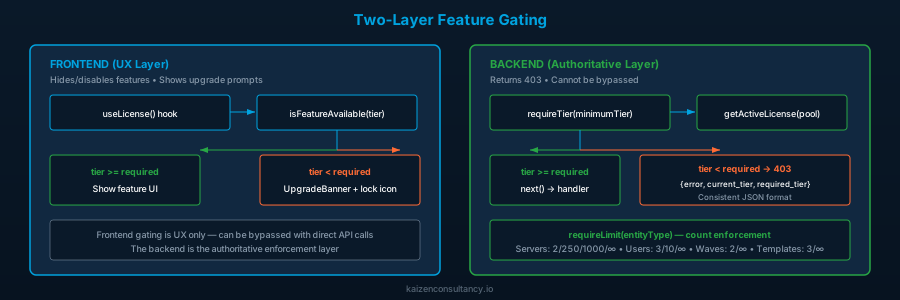
Feature gating operates at two levels: backend middleware (authoritative) and frontend context (UX).
Backend: requireTier() Middleware
function requireTier(minimumTier) {
  return async (req, res, next) => {
    const { pool } = req.app.locals;
    const license = await getActiveLicense(pool);
    const currentLevel = TIER_HIERARCHY.indexOf(license.tier);
    const requiredLevel = TIER_HIERARCHY.indexOf(minimumTier);

    if (currentLevel < requiredLevel) {
      return res.status(403).json({
        error: `This feature requires a ${minimumTier} license or higher`,
        current_tier: license.tier,
        required_tier: minimumTier,
      });
    }

    req.license = license;
    next();
  };
}
Applied per-route or per-router:
router.get('/premium-endpoint', requireTier('professional'), handler);
Backend: requireLimit() Middleware
Enforces entity count limits before creation:
function requireLimit(entityType) {
  const limitKey = `max_${entityType}`;
  const tableMap = {
    servers: 'servers',
    users: 'users',
    waves: 'migration_waves',
    templates: 'task_templates',
  };

  return async (req, res, next) => {
    const license = await getActiveLicense(pool);
    const maxAllowed = license[limitKey];

    // Unlimited check
    if (maxAllowed === Infinity || maxAllowed >= 999999) return next();

    const countResult = await pool.query(`SELECT COUNT(*)::int AS count FROM ${table}`);
    if (countResult.rows[0].count >= maxAllowed) {
      return res.status(403).json({
        error: `${entityType} limit reached (${currentCount}/${maxAllowed}). Upgrade your license to add more.`,
        current_count: currentCount,
        max_allowed: maxAllowed,
        current_tier: license.tier,
      });
    }
    next();
  };
}
Frontend: LicenseContext
The frontend fetches GET /api/license on load (no authentication required - this endpoint is public for gating purposes) and provides two hooks:
const { isFeatureAvailable, isWithinLimit } = useLicense();

// Check tier access
if (!isFeatureAvailable('professional')) {
  // Hide or disable the feature
}

// Check entity limits
const canAddMore = isWithinLimit('servers', currentCount);
The frontend gating is purely UX - it hides buttons and shows upgrade prompts. The backend middleware is the authoritative enforcement layer. Even if the frontend is bypassed (e.g., direct API calls), the backend returns 403.
License Activation Flow
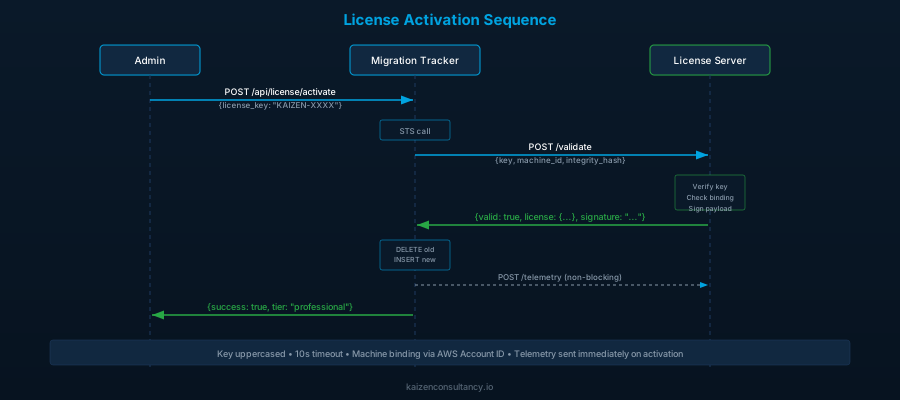
Key details:
- The key is uppercased and trimmed before validation
- Any existing license is deleted before inserting the new one (single active license)
- The license server URL and API key must be configured - returns 503 if missing
- A 10-second timeout is applied to the validation call
- Telemetry is sent immediately after activation so the server has current usage counts
Security Architecture
Defence Layers
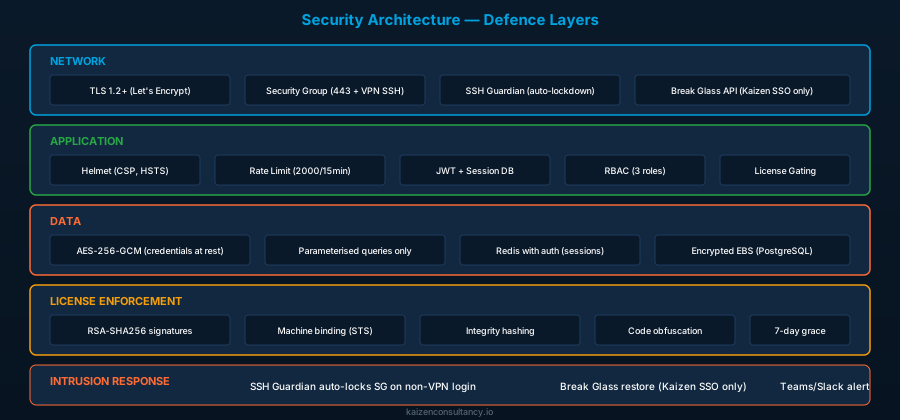
Credential Encryption
All sensitive fields stored in the database are encrypted at rest using AES-256-GCM with a dedicated encryption key (CREDENTIAL_ENCRYPTION_KEY). This key is mandatory in production - the application refuses to start without it.
Encrypted fields include: AWS access keys, AWS secret keys, AWS session tokens, SSO client secrets, Azure DevOps PATs, Slack webhook URLs, Teams webhook URLs, and VMware credentials.
Format: enc:<iv_hex>:<auth_tag_hex>:<ciphertext_hex>
Session Management
- Access tokens: 24-hour expiry, SHA-256 hashed and stored in
active_sessionstable - Refresh tokens: 7-day expiry, type-checked (cannot be used as access tokens)
- Session validation on every request: token must exist in
active_sessionsAND not be expired - Hourly cleanup of expired sessions
- Logout deletes the session record immediately
SSH Guardian & Break Glass
A systemd service monitors SSH authentication logs. If a successful login is detected from a non-VPN IP:
- All port 22 security group rules are revoked except the VPN CIDR
- A Teams/Slack notification is sent
- The event is logged
Recovery is available via an in-app API (/api/break-glass/restore) restricted to Kaizen SSO users with @kaizenconsultancy.io email addresses. All break-glass actions send notifications and are audit-logged.
Well-Architected Alignment
Security Pillar
| Principle | Implementation |
|---|---|
| Least privilege | IAM instance profile with only required permissions; RBAC with wave-level isolation |
| Encryption at rest | AES-256-GCM for credentials; PostgreSQL on encrypted EBS |
| Encryption in transit | TLS 1.2+ everywhere; HTTP redirected to HTTPS |
| Traceability | Audit log for all significant actions; X-Request-Id on every request |
| Automated response | SSH Guardian auto-locks security group on intrusion |
Reliability Pillar
| Principle | Implementation |
|---|---|
| Graceful degradation | 7-day license grace period; community fallback on any failure |
| Health monitoring | /health endpoint checks Postgres + Redis; returns 503 when degraded |
| Data durability | Automated database backups with S3 upload and retention policies |
| Recovery | Break-glass SSH recovery; backup restore with preview |
Operational Excellence Pillar
| Principle | Implementation |
|---|---|
| Observability | Structured JSON logging; Prometheus metrics; audit trail |
| Automation | 24h license revalidation; 30-min AWS sync; scheduled backups; SSL auto-renewal |
| Deployment | Single-command deploy script; Docker Compose orchestration; zero-downtime rebuild |
Cost Optimisation Pillar
| Principle | Implementation |
|---|---|
| Right-sized licensing | Tiered model matches customer scale; no over-provisioning |
| Serverless validation | License server runs on API Gateway + Lambda (scales to zero) |
| Minimal infrastructure | Single EC2 instance with containerised services |
License Server Cost Model
The license server infrastructure runs entirely serverless. With one validation call per customer per day and one telemetry heartbeat per day, the costs are negligible even at scale.
| Service | Monthly Cost (10 customers) | Monthly Cost (100 customers) | Notes |
|---|---|---|---|
| API Gateway | ~$0.01 | ~$0.07 | 600 requests/month (10 customers x 2 calls/day) to 6,000 |
| Lambda | $0.00 | $0.00 | Free tier: 1M requests/month. 6,000 invocations is 0.6% |
| DynamoDB | $0.00 | ~$0.01 | PAY_PER_REQUEST. 10 items read/written per day |
| SSM Parameter Store | $0.00 | $0.00 | Standard tier parameters are free |
| CloudWatch Logs | ~$0.01 | ~$0.05 | Minimal log volume |
| Total | ~$0.02/month | ~$0.13/month |
At 100 customers each paying a minimum of $8,000, the license server infrastructure costs $0.13/month to validate $800,000+ in license revenue. The ratio of infrastructure cost to revenue is 0.000016%.
Why Serverless
The license server receives exactly 2 requests per customer per day (one validation, one telemetry). At 100 customers, that is 200 requests per day, or 6,000 per month. A t3.micro running 24/7 would cost $8.50/month to handle 6,000 requests. The serverless approach costs $0.13/month for the same workload and requires zero maintenance, zero patching, and zero scaling configuration.
The API Gateway usage plan provides DDoS cost protection: 10 requests/second rate limit and 10,000 requests/day quota. Even if a customer’s deployment malfunctions and sends requests in a loop, the cost is capped at the quota limit.
Summary
The licensing system provides cryptographic enforcement of entitlements on customer-controlled infrastructure. The combination of RSA signatures (prevents forging), machine binding (prevents sharing), integrity hashing (detects code modification), and signed payload storage (detects database tampering) creates a layered defence that doesn’t rely on any single control.
The grace period ensures reliability - customers never lose access due to transient issues - while the 24-hour revalidation cycle ensures revoked licenses are enforced within a bounded timeframe.
Availability
The Cloud Migration Tracker is currently in final end-to-end testing across all licence tiers. We expect to open the marketplace listing within the next few days. If you are planning an AWS migration and want early access or a demo, get in touch.
For more information, contact Kaizen Cloud Consultancy.