Overview
The Cloud Migration Tracker is a self-hosted platform deployed into the customer’s own AWS account. Unlike SaaS products where the vendor controls the runtime, our licensing system must enforce entitlements on infrastructure we don’t own or operate. This creates a unique challenge: how do you prevent tampering when the customer has root access to the machine?
This post covers the full licensing architecture - from cryptographic validation to frontend feature gating - and the security measures that protect both the license system and the customer’s AWS credentials.
Most newsletter platforms charge £16 or more per month for a thousand subscribers. Ours costs about 15p. Here is how we built it, why we made the choices we did, and what it looks like under the hood.
TL;DR for non-techies
If you have subscribed to our blog (or are thinking about it), here is what happens behind the scenes. You enter your email, we send you a confirmation link, and once you click it you are on the list. When we publish a new post, you get an email with a summary and a link. That is it. No tracking pixels, no marketing funnels, no selling your data to advertisers.
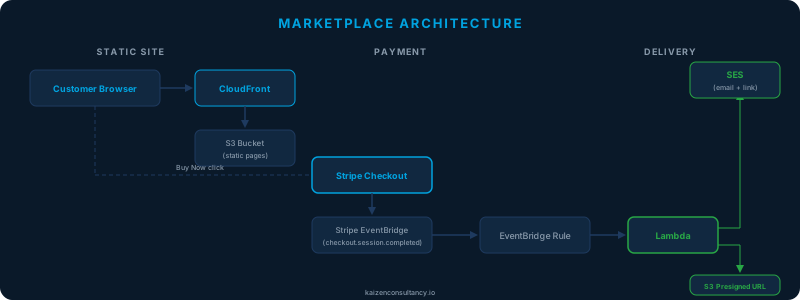
Most marketplace platforms cost thousands a month to run. Ours costs thirteen pence. Not thirteen pounds - thirteen pence. The kind of money you find between sofa cushions.
This is the story of how we built a fully automated digital marketplace on AWS - and why the architecture decisions behind it might change how you think about selling anything online.
The architecture
AWS shipped hundreds of updates in March 2026. Most of them will never affect your day-to-day work. Here are the ones that will.
Aurora PostgreSQL joins the free tier with express configuration
This is the biggest practical change for teams building on AWS this month. Aurora PostgreSQL Serverless is now available on the AWS Free Tier with up to 4 Aurora Capacity Units (ACUs) and 1 GiB of storage per cluster. More importantly, AWS introduced “express configuration” - a streamlined creation flow that spins up an Aurora PostgreSQL serverless cluster in seconds, without requiring a VPC.
We practice what we preach. This website is built and deployed using the same principles, tools, and frameworks we recommend to our clients. Here’s a complete breakdown of how kaizenconsultancy.io is architected, secured, deployed, and what it actually costs to run.
TL;DR for non-techies
This website costs about a pound a month to run. It’s hosted on Amazon’s cloud infrastructure, loads fast anywhere in the world, is secured to enterprise standards, and can be rebuilt from scratch in 10 minutes. Every part of it is automated - no manual steps, no clicking through dashboards, no room for human error. We built it this way because it’s exactly how we’d build cloud infrastructure for a client. If we can’t do it for our own site, why would you trust us to do it for yours?
If you’re still provisioning cloud resources by clicking through the AWS console or Azure portal, you’re building on sand. Every manual step is a risk - unrepeatable, undocumented, and impossible to audit.
The problem with manual provisioning
We’ve seen it dozens of times across a decade of cloud engineering. An engineer builds a VPC by hand, configures security groups from memory, and deploys an application with a series of CLI commands they half-remember. It works. Until it doesn’t.
A Well-Architected Review isn’t an audit. It’s not a pass/fail exam. It’s a structured conversation about your cloud workloads that identifies risks, highlights improvements, and gives you a clear plan to make things better.
How it works
The review is built around six pillars:
- Operational Excellence - how you run and monitor your workloads
- Security - protecting your data and systems
- Reliability - recovering from failures and meeting demand
- Performance Efficiency - using resources effectively
- Cost Optimisation - avoiding unnecessary spend
- Sustainability - minimising environmental impact
For each pillar, we work through a series of questions about your architecture, processes, and practices. It’s collaborative - we’re not there to judge, we’re there to find opportunities.
One of the first questions we get asked is “how much will it cost to move to the cloud?” The honest answer is: it depends. But that’s not very helpful, so here’s a more practical breakdown.
The three types of cost
Cloud migration costs fall into three buckets:
1. The migration itself - the work to plan, build, and move your workloads. This includes architecture design, landing zone setup, application assessment, and the actual migration execution. For most organisations, this is the biggest upfront cost.
No posts match your search. Try a different term or clear the filters.